eCommerce Integration Solutions: How to Scale Without the Integration Bottleneck
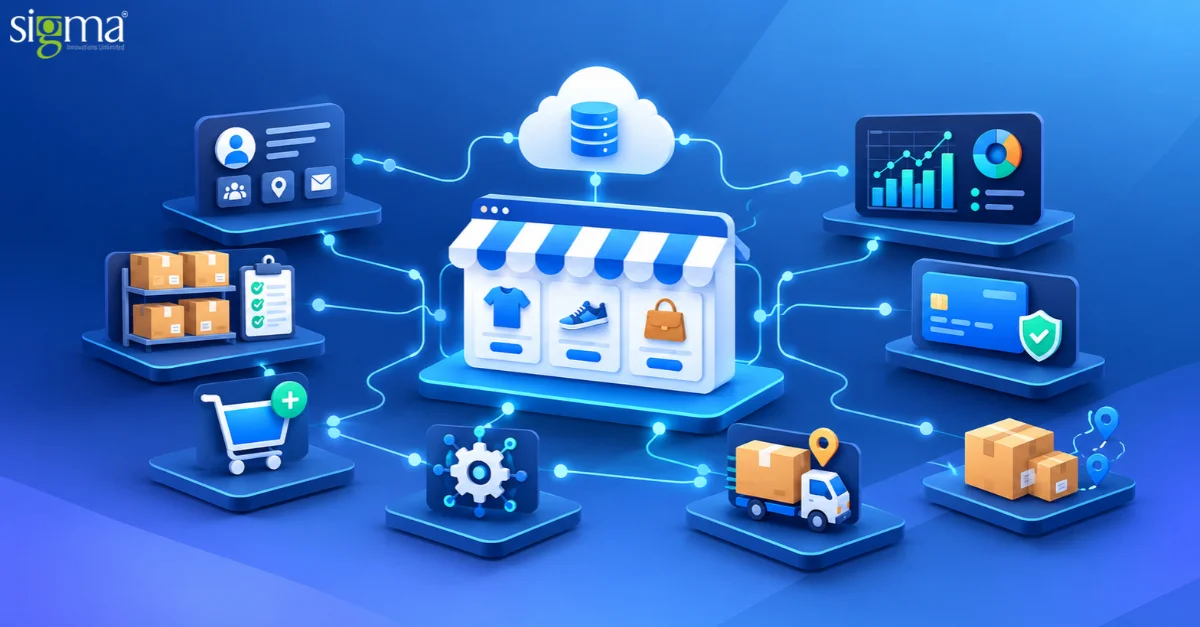
Key Takeaways:
- Disconnected systems and manual workflows slow order processing as eCommerce operations scale.
- Inconsistent inventory and data synchronization can lead to overselling, fulfillment delays, and poor customer experiences.
- A scalable integration architecture connects commerce platforms with ERP, CRM, inventory, warehouse, and logistics systems through reliable data flows and failure recovery.
- Sigma Infosolutions provides eCommerce integration services across Magento/Adobe Commerce, Shopify, and WooCommerce to help businesses streamline operations and prepare for growth.
Introduction
An eCommerce ecosystem often spans multiple business systems, from ERP and accounting software to payment gateways, marketplaces, CRM, and logistics providers. Each serves a specific purpose, but connecting them effectively requires careful planning as the technology environment evolves.
Adding new tools or sales channels without reviewing existing connections can introduce architectural complexity, make future changes harder to manage, and increase maintenance effort.
Sigma Infosolutions provides eCommerce integration solutions across Magento/Adobe Commerce, Shopify, and WooCommerce, helping businesses evaluate their existing integration landscape and determine how their systems can work together as operational requirements evolve.
Need to connect your commerce systems reliably?
Why Do eCommerce Integrations Become a Bottleneck?
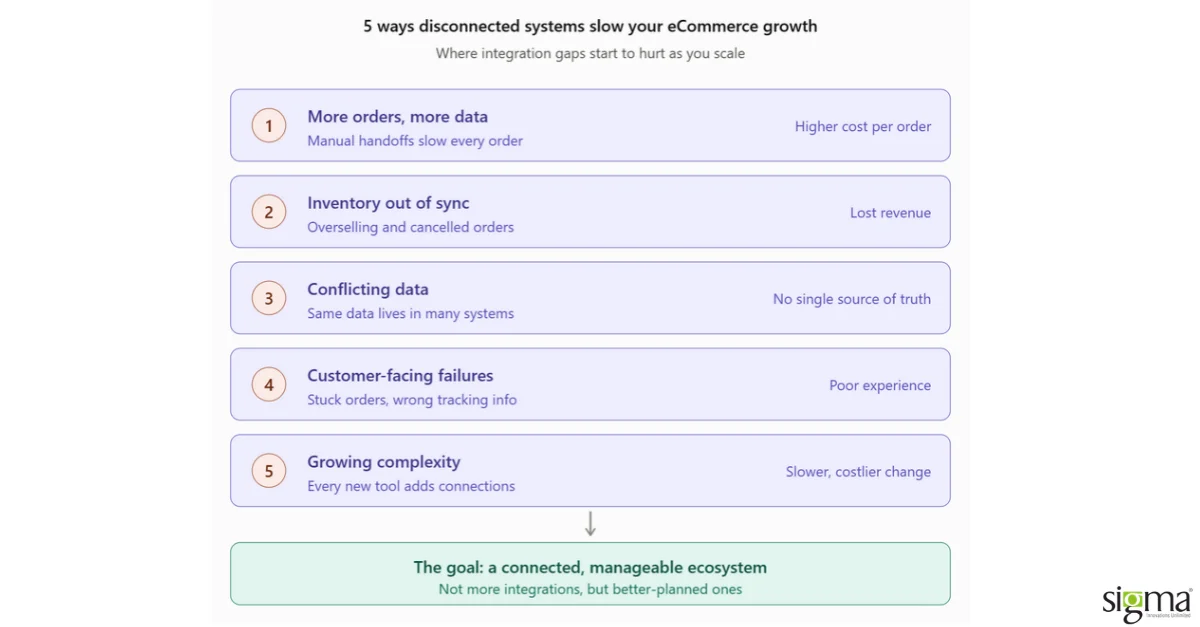
1. More Orders Mean More Data to Manage
As order volumes increase, manually moving information between systems becomes difficult.
For example, an order placed on an eCommerce website may need to be sent to an ERP, inventory needs to be updated, the warehouse needs to receive the order, and shipping information needs to be sent back to the customer.
If these steps depend on manual work, even a small delay or mistake can affect the entire order process.
As volumes rise, this manual effort can increase the cost of processing each order. Teams spend more time correcting records and chasing updates, leaving less capacity to support new products, channels, or markets.
Automation helps businesses handle higher volumes without increasing manual effort at the same rate.
2. Inventory Needs to Stay in Sync
Inventory is one of the most important areas affected by integration.
A business may sell through its website, marketplaces, physical stores, and other channels. If inventory information is not updated consistently, customers may see incorrect stock availability.
This can lead to:
- Overselling products
- Cancelled orders
- Delayed fulfillment
- Manual inventory corrections
- Poor customer experience
These problems also have a commercial cost. Cancelled orders can mean lost revenue, while refunds and stock enquiries increase customer-service workload. Inaccurate stock allocation across channels can leave available products unsold in one location while another channel runs out.
A well-planned integration helps keep inventory information synchronized across the systems that need it.
3. Different Systems Can Create Different Data
As businesses add more applications, the same information may exist in multiple places.
For example, product prices may be maintained in an ERP while customers see them on the eCommerce website. Customer information may exist in both the website and CRM. Order information may be shared between the website, ERP, warehouse, and shipping provider.
If these systems are not properly connected, businesses can end up with conflicting information.
A good integration strategy should clearly define where important data comes from and how it is shared with other systems.
4. Integration Problems Can Affect Customers
Integration issues are not always visible to the business immediately. But customers can experience their impact.
An incorrect inventory update can result in an unavailable product being purchased. A failed payment update can leave an order stuck. A delayed shipping update can prevent customers from seeing accurate tracking information.
In other words, integration is not just a back-office technology concern. It can directly affect the customer experience.
5. More Integrations Can Mean More Complexity
As a business grows, it naturally adds new tools and platforms.
A company may start with an eCommerce platform and ERP. Later, it may add a CRM, marketplace, payment gateway, warehouse system, shipping provider, and marketing platforms.
If every new system is connected without considering the overall architecture, the integration environment can become difficult to manage.
This can make future changes slower and more expensive.
This can increase integration maintenance costs and make new channels slower to launch. Adding a marketplace, warehouse, or regional operation may require changes across several existing connections, increasing development and testing effort and slowing expansion.
The goal should not be to simply add more integrations. It should be to create a connected and manageable eCommerce ecosystem.
7 Signs Your eCommerce Integration May Be Holding You Back
- Your team manually moves data between systems
- Inventory frequently needs manual correction
- Orders sometimes fail to reach ERP or fulfillment systems
- Different systems show different information
- Adding a new marketplace requires significant development
- Integration problems are discovered only after they affect operations
- Existing integrations are becoming increasingly difficult to maintain
If several of these sound familiar, your business may have outgrown its current integration architecture.
What a Scalable eCommerce Integration Architecture Looks Like
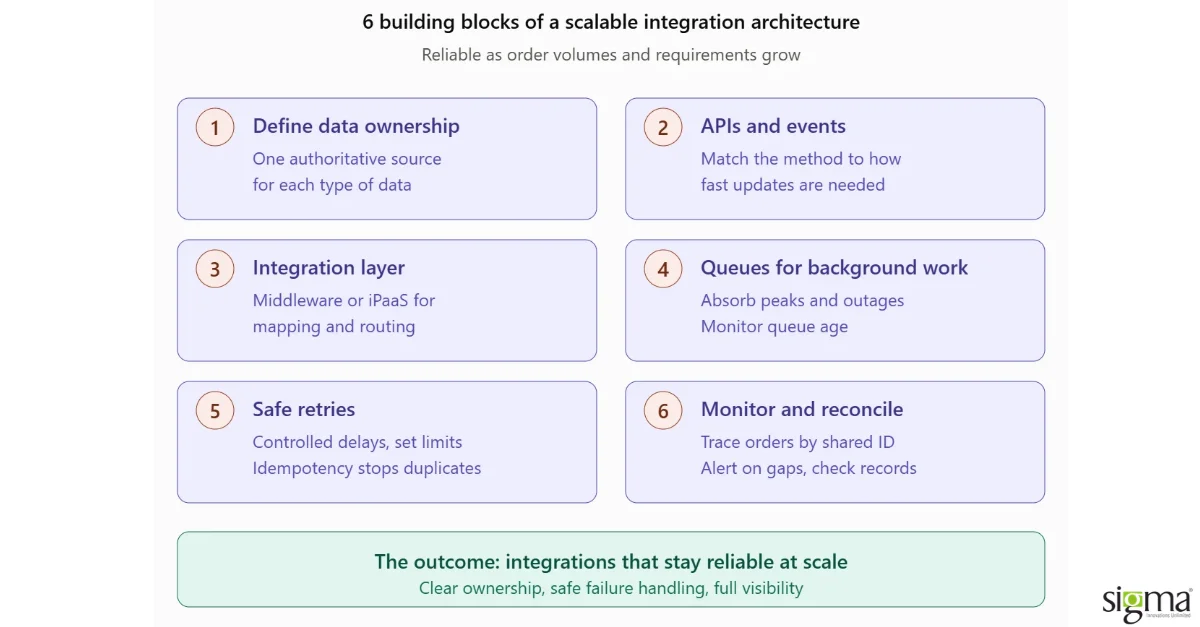
A scalable architecture defines how systems exchange information, which system owns each type of data, and what happens when an update fails. Six principles help integrations remain reliable as order volumes and business requirements grow.
1. Define data ownership
Assign an authoritative source for product information, prices, stock availability, and order status. For example, the ERP may own pricing while an inventory or warehouse system owns stock balances. The right ownership model depends on the business, but each data type needs a clear source to prevent conflicting updates.
2. Use APIs and events appropriately
APIs provide defined interfaces for exchanging information. Webhooks or events can notify connected systems when an order is placed, inventory changes, or a shipment is dispatched. Choose the approach according to how quickly updates are needed and what each platform supports.
3. Introduce an integration layer where needed
Middleware or an integration platform as a service (iPaaS) can centralize data mapping, routing, and connection management. This can reduce repeated logic across individual connections and make changes easier to manage. The choice should reflect the business’s complexity, transaction volumes, budget, and support requirements.
4. Use queues for background processing
Queues can hold updates while a downstream system is busy or temporarily unavailable. This helps absorb demand peaks and allows suitable background tasks to run independently of checkout. Monitoring queue age and processing delays helps teams identify backlogs before they affect fulfillment.
5. Make retries safe
Temporary failures should trigger retries with controlled delays and a defined limit. Idempotency ensures that processing the same request again does not create another business transaction, such as a duplicate order. Persistent failures need an exceptional workflow and a clear owner.
6. Monitor transactions and reconcile records
Integration observability means being able to follow a transaction across systems and understand where it has slowed or failed. Track orders using a shared identifier, alert teams to missing or delayed updates, and reconcile records periodically to identify discrepancies between systems.
Example: What Happens When an Order Update Fails?
Consider a retailer with this illustrative order flow:
Customer places an order → payment is confirmed → order reaches the ERP → stock is reserved → warehouse or third-party logistics provider receives the fulfillment request → shipping and tracking updates return to the commerce platform → customer receives a notification.
The exact sequence depends on the retailer’s payment, inventory, and fulfillment rules.
If the ERP is temporarily unavailable, the integration can retain the update in a queue and retry it. If the ERP accepted the order but its response was lost, an idempotency check prevents the retry from creating a duplicate order.
If retries continue to fail, monitoring alerts the responsible team. Reconciliation can then identify orders recorded in the commerce platform without a matching ERP record, allowing the team to investigate and recover them.
This makes failures visible and gives teams a controlled recovery process instead of relying on customers or warehouse staff to discover missing orders.
Read our success story: Enabling Multi-Brand Digital Commerce Transformation for Australia based Pest Control and Turf solutions
How Can Businesses Avoid Integration Bottlenecks?
Avoiding integration bottlenecks starts with looking at the overall eCommerce ecosystem rather than individual systems.
Businesses should first map how information moves between their eCommerce platform, ERP, inventory, payment, warehouse, shipping, CRM, and other connected systems. This helps identify where data is being duplicated, where teams rely on manual work, and where delays or errors are occurring.
From there, businesses can:
- Automate high-volume processes where manual work creates delays or errors.
- Prioritize business-critical integrations that directly affect orders, inventory, payments, and customer experience.
- Assign ownership for integration alerts and define how failed or delayed transactions will be investigated, retried, and reconciled.
- Review the architecture before adding new systems or channels to avoid unnecessary complexity.
Taking this approach helps businesses build an integration environment that is reliable, manageable, and better prepared for future changes.
Questions to Ask Before Scaling Your eCommerce Operations
1. When should a business review its eCommerce integration architecture?
If your team is spending increasing amounts of time manually updating orders, inventory, customer information, or reports, your integrations may be creating an operational bottleneck.
Frequent synchronization errors, delayed fulfillment, inconsistent data, and difficulty adding new sales channels are also signs that your current integration setup may not be scaling with the business.
2. Should I fix my existing integrations or replace them as my business grows?
Not every integration needs to be replaced.
The right approach is to first identify where the existing setup is creating delays, errors, or unnecessary complexity. Some integrations may only need optimization, while others may need to be redesigned or replaced.
Reviewing the overall integration architecture can help businesses make this decision based on actual operational needs.
3. What should I prioritize when integrating my eCommerce store with an ERP or other business systems?
Start with processes that have the greatest impact on revenue, customer experience, and daily operations.
Order processing, inventory, payments, fulfillment, and customer information are often high-priority areas.
It is also important to establish which system is responsible for each type of data and how updates should flow between systems.
4. How can I add new marketplaces, warehouses, or business systems without making my eCommerce setup more complicated?
Before adding another connection, businesses should review their existing integration architecture.
A scalable approach should make it easier to introduce new channels and systems without creating a growing network of difficult-to-maintain connections.
Planning for future expansion during integration design can reduce redevelopment and maintenance effort later.
5. What should I look for in an eCommerce integration partner?
Look beyond the ability to connect two systems.
An experienced integration partner should understand your business processes, existing technology ecosystem, data flows, scalability requirements, and potential failure scenarios.
Experience with your eCommerce platform and the systems you need to connect is also important, along with the ability to support the integration as your business evolves.
From Point-to-Point Integrations to a Scalable Commerce Architecture
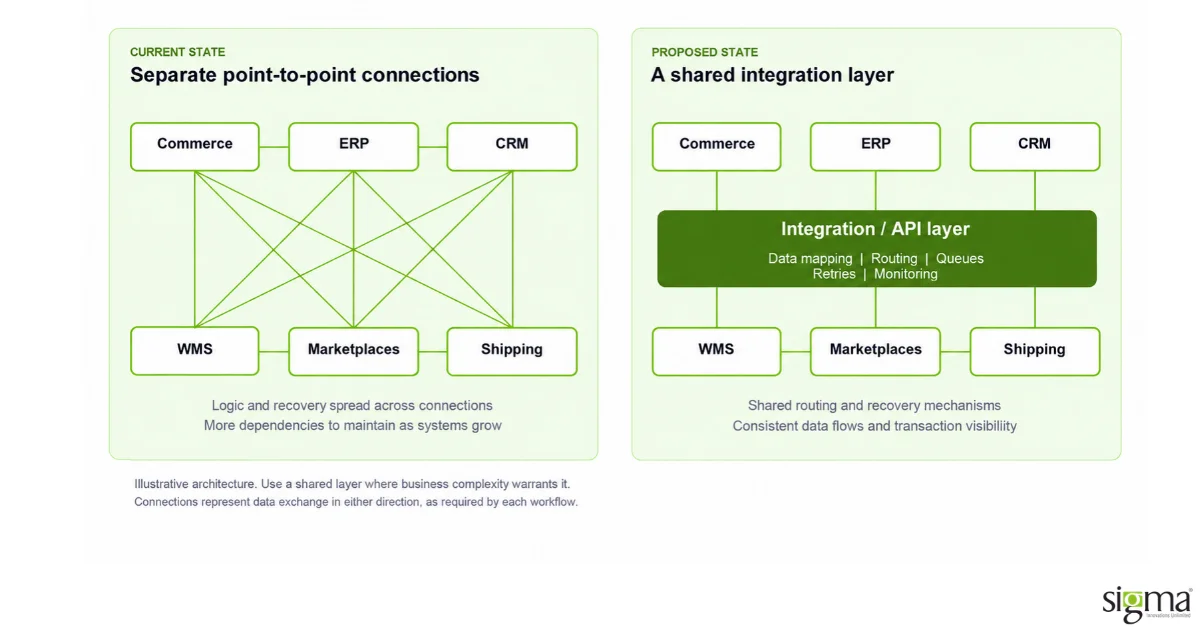
Where integration complexity warrants it, a shared integration layer can centralize data mapping, routing, and recovery processes. This can make connections easier to manage as systems and sales channels are added.
How Sigma Helps Businesses Build Scalable eCommerce Integrations
Sigma Infosolutions helps commerce businesses assess their existing integrations and identify where manual processes, fragile connections, or inconsistent data are slowing operations.
Across Magento/Adobe Commerce, Shopify, and WooCommerce environments, this work can include mapping order and inventory flows, defining which system owns each type of data, and deciding which existing connections to optimize or redesign.
Depending on the business’s requirements, Sigma can implement API-based or event-driven integrations between commerce platforms and ERP, CRM, inventory, warehouse, payment, marketplace, and logistics systems. Monitoring, failure recovery, and reconciliation can be incorporated into the design to help teams identify and resolve missing or delayed updates.
The priorities should reflect the business’s immediate challenges: reducing manual order handling, improving inventory consistency, or making it easier to introduce another warehouse or sales channel.
As eCommerce operations expand, disconnected systems and complex integrations can slow order processing, increase maintenance costs, and make new channels harder to launch. A scalable integration architecture helps keep data consistent, operations connected, and growth manageable.
Conclusion
eCommerce growth depends on more than adding new sales channels or systems. It requires an integration architecture that keeps orders, inventory, and business data flowing reliably as operations expand. By addressing synchronization issues, automating critical workflows, and planning for future connections, businesses can reduce operational complexity and scale with greater confidence.
Sigma Infosolutions provides eCommerce integration solutions across Magento/Adobe Commerce, Shopify, and WooCommerce to help businesses build a more connected, manageable commerce ecosystem.
Planning to Scale Your eCommerce Operations?
FAQs
1. What should businesses consider before choosing eCommerce integration solutions?
Evaluate compatibility with your existing commerce platform, business applications, transaction volumes, customization requirements, ongoing maintenance, and future expansion plans. The solution should fit your current technology environment without creating unnecessary dependencies.
2. How much do eCommerce integration services cost?
Costs depend on the number and complexity of integrations, API availability, custom development, data migration, testing, and ongoing support. A technical assessment can help establish the scope, implementation priorities, and expected investment.
3. Is custom eCommerce integration better than using prebuilt connectors?
Prebuilt connectors can be suitable for standard workflows and supported applications. Custom integrations offer greater flexibility when business processes, data models, or system requirements fall outside those capabilities. A hybrid approach may be appropriate for complex commerce environments.
4. How long does an eCommerce integration project take?
Timelines vary based on the number of systems involved, API readiness, data complexity, custom requirements, and testing needs. A straightforward connector implementation generally requires less effort than a multi-system integration involving legacy applications or complex business rules.
5. Can existing eCommerce integrations be upgraded without replacing the entire system?
Yes. Existing integrations can often be optimized or selectively redesigned while retaining systems that continue to meet business requirements. The appropriate approach depends on technical limitations, support availability, business priorities, and the cost of maintaining the current setup.
6. What is the role of middleware in eCommerce integration?
Middleware acts as an intermediary between applications, supporting functions such as data transformation, routing, and communication between systems. It can be useful when businesses need to coordinate multiple applications or manage integration logic independently of individual platforms.
7. How should businesses choose an eCommerce integration partner?
Look for experience with your commerce platform and business applications, API and custom integration expertise, a clear testing methodology, and the ability to support integrations after deployment. Ask prospective partners how they approach legacy systems, third-party dependencies, documentation, and ongoing maintenance.
8. Does Sigma Infosolutions provide custom eCommerce integration development?
Sigma Infosolutions provides eCommerce integration and software development services across Magento/Adobe Commerce, Shopify, and WooCommerce. Engagements can be tailored to business requirements, including connecting third-party applications, extending existing integrations, and developing custom interfaces between commerce systems.