Magento Upgrade Strategy: Why End-of-Life Risk Cannot Wait for the Next Planning Cycle

Key Highlights:
- Delaying a Magento upgrade can increase security exposure, extension compatibility issues, and compliance risks.
- Rushed, deadline-driven migrations leave less time for testing, data validation, and resolving custom code conflicts.
- Auditing extensions, customizations, and security exposure early helps retailers plan upgrades around actual risk and technical complexity.
- Sigma Infosolutions provides Magento upgrade and development services to help retailers assess migration risks, plan upgrades, and minimize operational disruption.
Introduction
Retailers running an older Magento version frequently frame the upgrade decision as a simple calendar question, waiting until Adobe formally announces an end-of-life date before treating the migration as urgent. This framing understates the real risk, since security patch coverage, third-party extension compatibility, and PCI compliance requirements start eroding well before the formal end-of-life date arrives, often quietly enough that a retailer does not notice the exposure until an audit or a security incident forces the issue. A sound Magento upgrade strategy treats end-of-life risk as a continuum that starts accumulating years before the deadline, not a single cliff edge that only matters once official support formally ends for the platform, by which point remediation options have already narrowed down considerably for the team involved and its wider set of stakeholders. For a CTO or IT Director at a growth-stage eCommerce company, the cost of a rushed, deadline-driven migration is almost always higher than the cost of a planned one started twelve to eighteen months earlier. This guide outlines how to assess actual risk exposure, sequence the audit and migration work correctly, and avoid the timeline compression that turns a manageable upgrade into a disruptive one.
Assess Your Magento Upgrade Risks
Identify compatibility gaps and technical risks before planning your Magento upgrade. Explore Magento Technical Audit Services
What End-of-Life Risk Actually Looks Like Before the Deadline
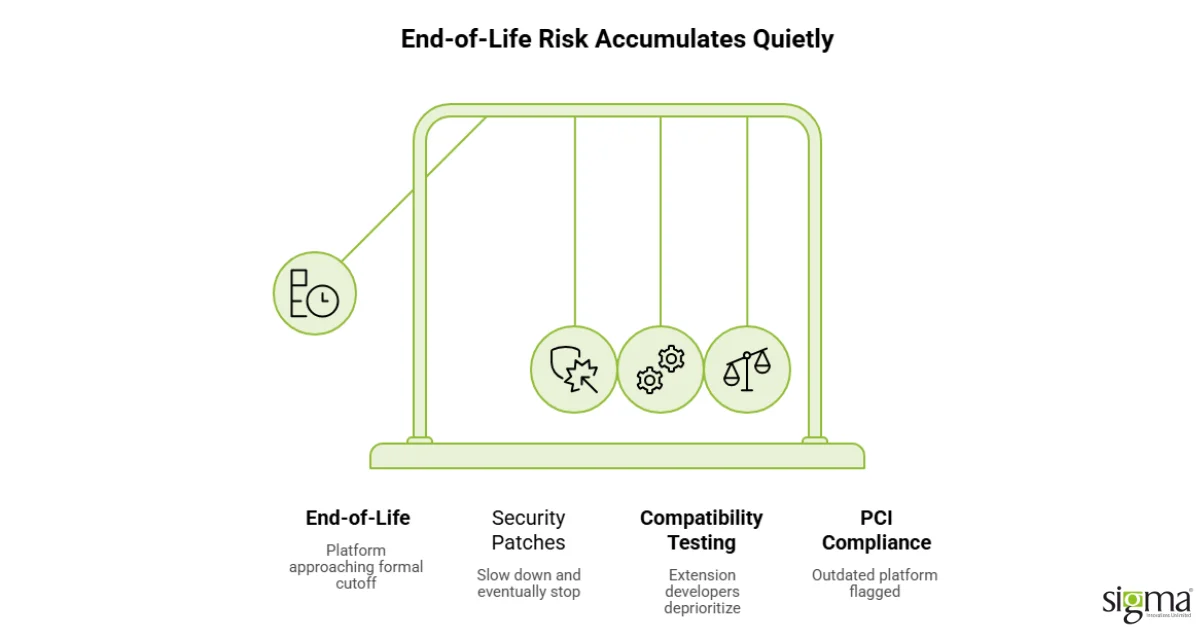
The period before formal end-of-life is where risk accumulates most quietly: security patches slow down and eventually stop, extension developers deprioritize compatibility testing for the older version, and PCI compliance scans increasingly flag the outdated platform version itself as a finding, regardless of how well the store has otherwise been maintained. A retailer relying on a version that is technically still supported but clearly approaching its end-of-life window is often already carrying meaningfully more exposure than the calendar date alone would suggest, since the ecosystem around the platform, extension vendors, security researchers, and compliance auditors, starts shifting attention to the newer version well in advance of the formal cutoff.
Why Waiting for the Deadline Increases Both Cost and Risk
Retailers who wait until the end-of-life date is imminent to begin planning a migration typically face a compressed timeline that increases both project risk and cost, since a rushed migration has less room for proper testing, staged rollout, and the careful data validation a Magento upgrade genuinely requires. The irony is that waiting does not actually reduce the work involved; it just compresses the same scope of work into a smaller, higher-pressure window, which is when migration projects are most likely to introduce new bugs, break third-party integrations, or require costly emergency support during the cutover itself.
Comparing an Early-Planning Approach to a Deadline-Driven One
| Approach | Deadline-Driven Migration | Early-Planning Migration |
|---|---|---|
| Timeline Pressure | Compressed, reactive | Managed, staged rollout possible |
| Testing Depth | Limited by shrinking window | Full regression and performance testing |
| Extension Compatibility | Discovered late, causes delays | Audited and resolved in advance |
| Security Exposure Window | Extended by delayed start | Minimized through earlier action |
Assessing Actual Risk Exposure, Not Just Version Number
A useful risk assessment looks past the raw version number to specific exposure factors: how the store handles payment data and whether PCI scope is affected, how many third-party extensions are installed and whether their vendors have announced compatibility timelines for the newer version, and how much custom code exists that will need to be re-audited during migration. Two retailers on the same Magento version can carry meaningfully different actual risk, one running a lean, mostly out-of-the-box implementation and another carrying years of accumulated custom extensions and integrations, which means the upgrade timeline should reflect this specific exposure rather than a generic industry benchmark.
That same discipline, treating version currency as an ongoing operational practice rather than a one-time event, is the foundation a sound Magento upgrade strategy is built on.
Building a Magento Upgrade Strategy That Fits the Store’s Actual Complexity
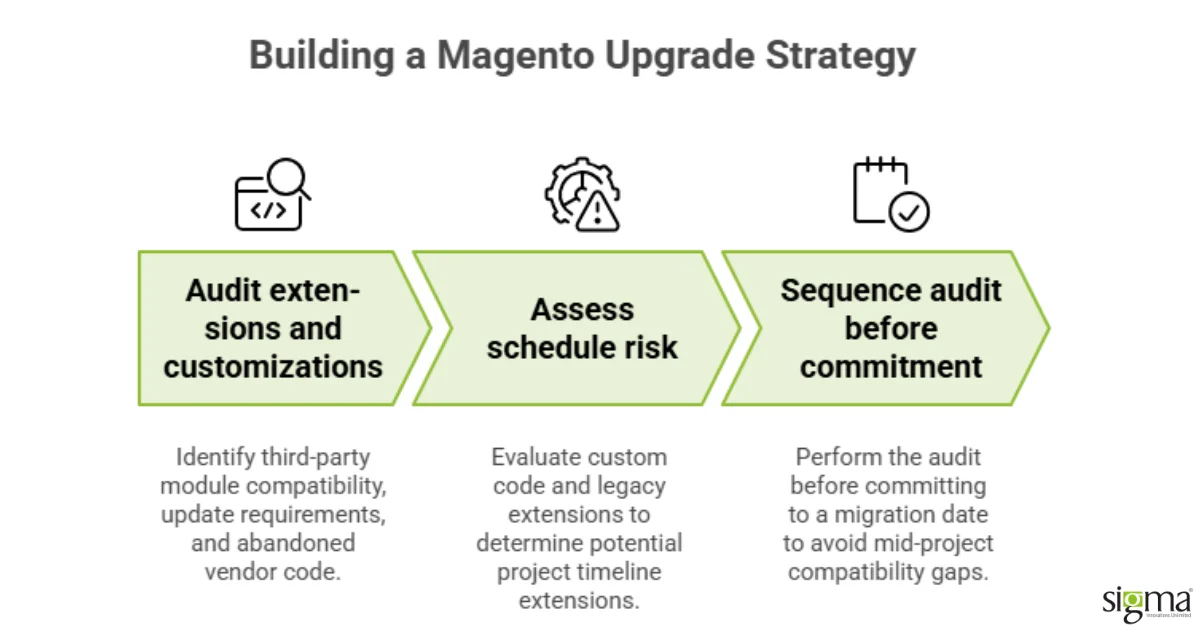
A workable migration plan starts with an extension and customization audit, identifying which third-party modules have confirmed compatibility with the target version, which need updates, and which have been abandoned by their vendor and require replacement or custom redevelopment. This audit typically surfaces the largest source of schedule risk in any Magento upgrade, since custom code and legacy extensions, not the core platform migration itself, are usually what extends a project timeline well beyond its original estimate. Sequencing the audit before committing to a migration date, rather than discovering compatibility gaps mid-project, is the single change that most consistently keeps a Magento upgrade on schedule.
The Upgrade Sequencing Sigma Maps Before Any Magento Migration
Sigma Infosolutions scopes Magento upgrades for growth-stage eCommerce retailers by starting with a full extension and customization audit before committing to a migration timeline, rather than treating the upgrade as a fixed-scope project estimated from the version number alone. That approach has included staged migrations for retailers with complex customization histories and faster, more direct upgrades for retailers running leaner implementations, since the right pace depends on the store’s actual technical debt rather than a standard playbook applied uniformly.
Retailers who treat this as an ongoing risk management practice, rather than a deadline-driven emergency, consistently spend less on the eventual migration and carry less security exposure throughout the process leading up to it.
Planning the Data Migration and Cutover Window Carefully
Beyond code and extension compatibility, the data migration itself, customer records, order history, and product catalog, deserves its own careful planning, since data integrity issues discovered after cutover are considerably more disruptive to resolve than issues caught during a staged testing period beforehand. A practical approach runs the full data migration against a staging environment first, validates record counts and key data relationships against the production source, and only schedules the live cutover once that validation is complete and documented. Retailers that skip this staging step in the interest of speed are the ones most likely to discover a data integrity issue in production, at the point it is hardest and most disruptive to fix without customer-facing impact.
This same B2B commerce feature set that becomes relevant during a Magento upgrade, particularly for retailers serving both consumer and business buyers from the same platform, is covered in more depth separately, since the upgrade decision and the B2B feature evaluation often happen around the same planning cycle. Evaluating both together, rather than treating the platform upgrade and the B2B feature roadmap as separate projects, tends to produce a more coherent long-term architecture.
Delaying a Magento upgrade past end-of-life carries a compounding trade-off: every additional month without vendor security patches increases breach risk, but an upgrade rushed to meet a deadline without proper regression testing carries its own risk of post-launch defects. The right approach weighs the urgency of the end-of-life deadline against the testing time a safe upgrade actually requires, skipping that testing window is not a trade-off worth making.
Also, read the blog: A Magento Performance Monitoring Cadence Is What Keeps Your Fixed Store From Slowing Down Again
Conclusion
A sound Magento upgrade strategy treats end-of-life risk as a continuum that accumulates well before the formal deadline, not a single cliff edge that only matters once support officially ends. Security patch coverage, extension compatibility, and PCI compliance exposure all begin eroding in the period leading up to end-of-life, often quietly enough that retailers underestimate how much risk has already accumulated. Waiting until the deadline is imminent compresses the same scope of migration work into a smaller, higher-pressure window, which increases both cost and the likelihood of a disruptive cutover. A useful risk assessment looks past the raw version number to specific exposure factors: payment data handling, extension count and vendor compatibility timelines, and the volume of custom code requiring re-audit. An extension and customization audit, completed before committing to a migration date, is the single step that most reliably prevents a Magento upgrade from running over schedule. Data migration deserves its own careful staging and validation process, since integrity issues are considerably more disruptive to resolve after a live cutover than during a staging period beforehand. Retailers that treat version currency as an ongoing operational practice, rather than a deadline-driven emergency, consistently spend less on the eventual migration while carrying less security exposure throughout. The right upgrade pace depends on a store’s actual technical debt and complexity, not a standard timeline applied uniformly across every retailer. Planning early gives a team room for staged testing and validation, which is what separates a smooth migration from a rushed one under deadline pressure. Getting ahead of end-of-life risk is considerably less disruptive, and less expensive, than responding to it after a compliance finding or security incident has already forced the question. This same planning discipline extends naturally into related platform decisions, including how B2B commerce requirements factor into the upgraded platform’s feature set going forward.
Upgrade Your Magento Store
Plan a reliable upgrade with expert Magento development services.
Frequently Asked Questions
1. How early should a retailer start planning a Magento upgrade before the end-of-life date?
Ideally twelve to eighteen months in advance, since the extension and customization audit alone can surface compatibility gaps that take considerable time to resolve properly. Starting this early gives the team room for staged testing rather than a compressed, deadline-driven migration under pressure and shrinking budget.
2. Does end-of-life risk only matter for PCI-scoped stores handling payment data directly?
No, though PCI-scoped stores do carry the clearest compliance-driven urgency. Security patch coverage and extension compatibility erode for every store on an aging version, regardless of PCI scope, which means the underlying security exposure applies broadly across essentially every retailer running an outdated platform version.
3. What is the biggest source of schedule risk in a typical Magento upgrade?
Custom code and third-party extensions, not the core platform migration itself, are usually what extends a project timeline beyond its original estimate. An extension audit completed early in the planning process is the single step that most reliably keeps a migration on schedule and within its original budget.
4. Can a retailer upgrade incrementally rather than all at once?
In many cases yes, particularly for retailers with significant customization, where an incremental approach reduces risk compared to a single large cutover. The right approach depends on the store’s specific technical debt and the team’s capacity to manage a staged rollout over time without disrupting live operations.
5. How much does a Magento upgrade typically cost for a mid-sized retailer?
Cost varies considerably based on customization depth and extension count, which is why an early audit matters so much for producing an accurate estimate. A lean, mostly out-of-the-box store costs meaningfully less to migrate than one carrying years of accumulated custom code and legacy integrations.