Hyva Theme Customization: What Merchants Need to Know Before Extending Beyond the Default Build

Key Highlights:
- Growth-stage retailers migrate to Hyva for the performance gain, then quietly lose it through unmanaged post-migration customization.
- Hyva theme customization done deliberately extends the platform’s checkout, personalization, and merchandising capability without rebuilding the performance case against it.
- Retailers that treat customization as a budgeted, measured decision keep the speed advantage that justified the migration in the first place.
- Sigma has extended Hyva implementations for eCommerce clients where every added module was evaluated against its performance cost first.
Introduction
Retailers who migrate to Hyva typically do so for a specific, measurable reason: faster page loads and a cleaner Core Web Vitals score than Luma or a legacy theme ever delivered for them. What happens in the twelve months after that migration determines whether the store keeps that advantage or slowly loses it. Hyva theme customization, the modules, checkout extensions, and personalization layers added after the initial build, is where that advantage either compounds or erodes, depending on whether each addition is evaluated against its performance cost or simply bolted on because a competitor has it. For a growth-stage eCommerce retailer whose margin depends directly on conversion rate, this is not a cosmetic decision to leave unmanaged or delegate entirely to a third-party agency.
Why Post-Migration Customization Gets Treated as an Afterthought
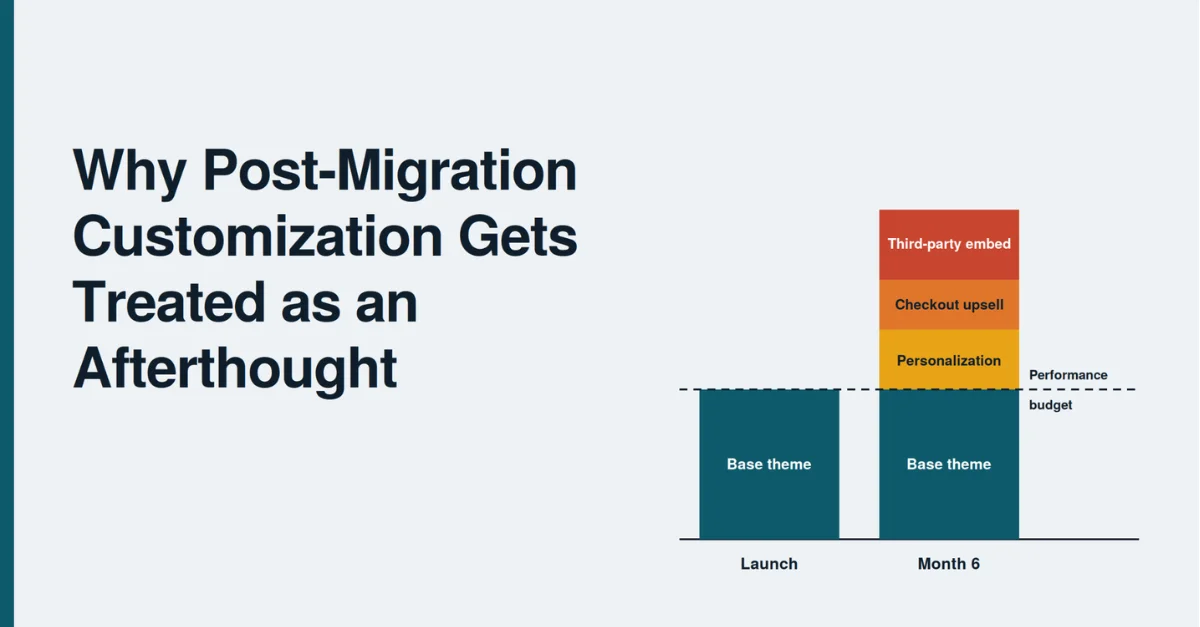
The migration itself usually gets rigorous performance benchmarking, since that is the entire justification for the project and the budget that was approved to fund it in the first place. What follows the migration rarely gets the same discipline: a merchandising team requests a personalization module, a marketing team wants a new checkout upsell, and each request gets evaluated on its own individual merit, in isolation, without reference to the performance budget the migration was originally built to protect. Six months in, a store that launched with a strong Core Web Vitals score can find itself back near where it started, having quietly added back the same page weight the migration was specifically meant to remove.
Where Hyva’s Architecture Actually Gives Room to Customize Safely
Hyva’s architecture, built on Tailwind CSS and Alpine.js rather than the heavier Knockout.js and RequireJS stack Luma relies on, gives genuinely more room for customization without the same performance penalty a comparable change would carry on a legacy theme. This is a real, measurable advantage, not a marketing claim, but it does not mean every kind of customization is free. A module built without Hyva’s component patterns in mind, using older jQuery-style scripts or unoptimized third-party embeds, can reintroduce the same render-blocking behavior Hyva was originally chosen to eliminate, regardless of how efficient the base theme underneath it actually remains.
Comparing Customization Approaches by Performance Impact
| Customization Approach | Performance Impact | Typical Outcome |
|---|---|---|
| Native Hyva component, Alpine.js pattern | Minimal, integrates with existing architecture | Preserves migration’s performance gain |
| Third-party extension, Hyva-compatible | Moderate, depends on extension quality | Requires benchmarking before and after |
| Legacy jQuery-based module ported over | Significant, reintroduces render-blocking scripts | Erodes the performance gain over time |
Building a Practical Filter for Hyva Theme Customization Decisions
A workable filter for evaluating any proposed addition to a Hyva store asks three specific questions before development starts: does the module use Hyva’s native component patterns rather than legacy script patterns, what is its measured load time impact in a staging environment, and does its expected conversion contribution justify that measured cost. Retailers that apply this filter consistently keep their Core Web Vitals score stable as the store’s feature set grows, while retailers that skip it discover the erosion only when a quarterly performance review shows the score has drifted without an obvious single cause.
That same discipline, evaluating every platform change against its performance impact before it ships, applies directly to Hyva customization decisions made well after the initial migration is complete.
Extending Checkout and Personalization Without Losing the Baseline
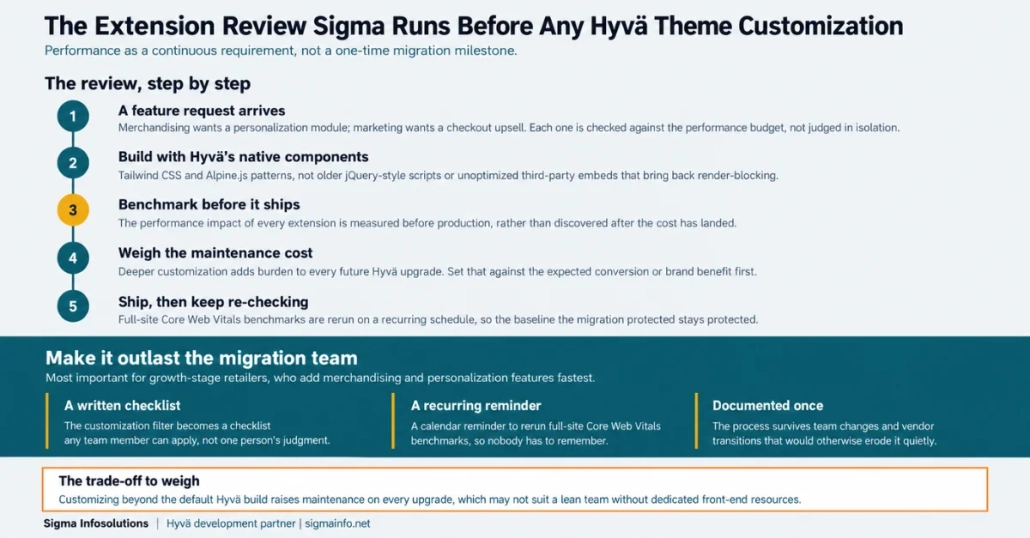
Checkout customization and personalization modules are where retailers most often trade away Hyva’s performance advantage, since these features tend to be the ones with the clearest, most immediately visible business case attached to them. The better approach is not avoiding these additions but sequencing them deliberately: implement using Hyva-native patterns where a compatible option exists, benchmark the specific page templates affected before and after each change, and treat a measurable Core Web Vitals regression as a signal to optimize the implementation rather than accept the trade-off silently.
The Extension Review Sigma Runs Before Any Hyva Theme Customization
Sigma Infosolutions, a Hyva development partner, extends Hyva implementations for growth-stage eCommerce retailers with performance treated as a continuous requirement rather than a one-time migration milestone. That work includes building checkout and merchandising customizations using Hyva’s native component architecture, and benchmarking the performance impact of every extension before it ships to production rather than discovering the cost after the fact.
Retailers that build this discipline into their ongoing development process protect the return on their original migration investment, rather than watching it erode one well-intentioned feature request at a time.
Setting a Governance Cadence That Outlasts the Migration Team
The team that runs the initial migration is not always the team maintaining the store a year later, which is often where this discipline quietly disappears, since the performance rationale that motivated the original project lives in institutional memory rather than a documented process. A practical fix is to formalize the customization filter into an actual checklist that any team member can apply, along with a recurring calendar reminder to rerun full-site Core Web Vitals benchmarks rather than relying on someone remembering to check. Retailers that document this process once, rather than relying on the original migration team’s judgment indefinitely, keep the discipline intact through team changes and vendor transitions that would otherwise quietly erode it.
This governance layer matters more for growth-stage eCommerce retailers specifically, since these are the businesses adding new merchandising and personalization features fastest as they scale, which means the gap between a documented process and an informal one compounds quickly during a period of rapid catalog and feature growth.
Weighing whether a Hyva investment or a full PWA rebuild is the right next step for a specific store, when the store is not yet on either, is a related but separate decision covered in more depth in Sigma’s comparison guide.
For Magento technical leads and eCommerce directors, customizing beyond Hyvä’s default build carries a real trade-off: deeper customization increases maintenance burden on every future Hyvä version upgrade, which may not be suitable for a lean team without dedicated front-end resources. The cost of that ongoing maintenance should be weighed against the conversion or brand benefit the customization is expected to deliver before committing engineering time to it.
Conclusion
Hyva theme customization is where a retailer’s migration investment either compounds or quietly erodes, depending on whether each addition is evaluated against its performance cost or simply added because a competitor has a similar feature. The migration itself typically gets rigorous benchmarking, but what follows rarely receives the same discipline, which is how a store with a strong initial Core Web Vitals score can drift back toward its pre-migration baseline within a year. Hyva’s Tailwind and Alpine.js architecture genuinely provides more room to customize without the performance penalty a comparable change would carry on a legacy theme, but this room is not unlimited, and a module built with legacy script patterns can reintroduce the exact problem the migration solved. A practical filter, checking whether a module uses native Hyva patterns, its measured staging performance impact, and its expected conversion contribution, keeps the store’s performance stable as its feature set grows over time. Checkout and personalization modules carry the highest erosion risk precisely because they carry the clearest business case, which makes deliberate sequencing more important for these additions than for lower-stakes ones. Retailers that build this evaluation into their ongoing development process protect the return on their original migration investment rather than losing it gradually. Formalizing that evaluation into a documented checklist, rather than relying on one team’s institutional memory, keeps the discipline intact through staff and vendor changes over time. The goal is not avoiding customization but making every addition a measured decision rather than a default one. Getting this discipline in place is what separates a Hyva migration that keeps paying off from one that quietly returns to where the retailer started within a year or two. Growth-stage retailers adding features fastest have the most to gain from formalizing this process early, before the gap between deliberate and default decisions has a chance to compound. A migration is a single event, but the discipline that protects its value has to run continuously for as long as the store keeps evolving.
Protect your store’s performance as it grows.
Frequently Asked Questions
1. Does customizing a Hyva theme always hurt its Core Web Vitals score?
Not necessarily, though it depends heavily on implementation. Customizations built using Hyva’s native Tailwind and Alpine.js component patterns tend to have minimal performance impact, while legacy jQuery-based modules ported over from an older theme are far more likely to reintroduce the render-blocking behavior Hyva was originally chosen to eliminate entirely.
2. How can we tell if our post-migration customizations are eroding our Hyva performance gain?
Track Core Web Vitals scores on the specific templates being modified before and after each significant change, rather than relying on an overall site average that can mask template-level regressions. A consistent downward trend following a specific addition is a clear signal worth investigating right away.
3. Are third-party extensions compatible with Hyva’s architecture?
Many are, but compatibility varies significantly by extension and vendor, so this should never be assumed. The safest approach is confirming that an extension is built for Hyva specifically, rather than adapted from a Luma-compatible version, and benchmarking its actual performance impact in staging before deploying it to production.
4. Is it worth customizing checkout on Hyva, given the performance risk?
Often yes, since checkout customization can have a clear, measurable conversion benefit that justifies its performance cost in most real-world cases. The key is implementing it using Hyva-native patterns where possible and benchmarking the specific checkout templates affected rather than assuming the change is performance-neutral.
5. How often should a Hyva store’s performance be reaudited after the initial migration?
A quarterly review is a reasonable baseline for most growth-stage retailers, with an additional benchmark run immediately after any significant new module or customization ships to production. Catching a regression early this way is considerably cheaper than discovering it during a broader periodic review months later.