Salesforce Implementation Cost in 2026: What to Expect and How to Plan Your Investment

Key Highlights
- Businesses that underestimate Salesforce implementation costs often face scope expansion, integration overruns, delayed go-lives, and rising consulting spend during deployment.
- Salesforce implementation costs extend far beyond licensing and include CRM configuration, data migration, third-party integrations, user training, and ongoing administration.
- Organizations that build a structured Salesforce budgeting framework early typically deploy faster, reduce rework, and improve long-term CRM adoption outcomes.
- Sigma Infosolutions, a Certified Salesforce Consulting Partner, helps businesses plan scalable CRM implementations with cost visibility across integrations, customization, security, and operational workflows.
Organizations that underestimate Salesforce implementation costs frequently encounter budget shortfalls mid-project, which delays go-live dates and forces compromises on configuration quality. The total investment in a Salesforce deployment extends well beyond the platform’s license fees and includes consulting hours, data migration, integration development, user training, and ongoing administration. Understanding how these components interact is essential for any business evaluating a CRM implementation in 2026. This blog outlines the primary cost drivers, typical price ranges by deployment type, and how to structure a realistic budget before committing to a project scope.
What Determines Salesforce Implementation Cost
Salesforce implementation cost is influenced by far more than platform licensing. The total investment depends on deployment scope, CRM customization requirements, consulting engagement, data migration complexity, third-party integrations, and long-term administration needs. Understanding these cost drivers early helps businesses build more accurate Salesforce budgeting frameworks and avoid expensive project overruns later in the implementation lifecycle.
License Fees Are Only the Starting Point
Salesforce pricing is structured around per-user, per-month license tiers that vary significantly by product edition and cloud. Sales Cloud Starter begins around $25 per user per month, while Enterprise and Unlimited editions can reach $165 to $330 per user per month. For a company deploying Salesforce to 50 users on the Enterprise tier, annual license costs alone can exceed $99,000 before a single line of configuration work begins.
The cloud product selected also determines the baseline cost structure. Sales Cloud, Service Cloud, Marketing Cloud, and Experience Clouds each carry distinct pricing models and require different levels of technical expertise to implement correctly. Organizations that require multiple clouds must account for both the additional license cost and the increased complexity of integrating data and processes across those products.
Consulting and Configuration Costs
Consulting fees represent the largest variable in any Salesforce implementation budget. For a standard Sales Cloud deployment covering lead management, opportunity tracking, and basic reporting, consulting costs from a certified partner typically range from $15,000 to $60,000, depending on the complexity of business processes and the number of custom objects required. Enterprise deployments with CPQ, complex approval workflows, or multi-territory management can push consulting fees to $150,000 or beyond.
The difference between a well-scoped and a poorly scoped implementation is often reflected directly in consulting hours. When business requirements are documented in detail before the project begins, consultants spend their time building rather than clarifying. Organizations that enter implementation engagements with incomplete requirements documentation consistently pay more in total consulting fees than those that invest in a structured discovery phase upfront.
Also, read the blog: Salesforce Chat Decoded: Case Creation, Conversation Routing, and ID Assignment Explained for Enterprise Support Teams
Data Migration and Integration Work
CRM implementation projects that involve migrating data from legacy systems or connecting Salesforce to external platforms, such as ERP systems, marketing automation tools, or e-commerce platforms, carry additional costs that are frequently underestimated. Data migration involves not just moving records but cleaning, deduplicating, and mapping them to Salesforce’s data model, which can require significant manual review for organizations with years of accumulated data quality issues.
Integration development costs depend on the number of connected systems, the complexity of the data flows, and whether pre-built connectors are available. A standard ERP-to-Salesforce integration using a middleware platform like MuleSoft or Boomi typically costs between $10,000 and $40,000 for design, development, and testing. Custom integrations built without a middleware layer require more direct engineering effort and carry higher long-term maintenance costs.
Salesforce Implementation Cost by Deployment Type
The table below provides a structured view of typical Salesforce budgeting ranges by project type, helping organizations align their planning expectations with realistic market benchmarks.
Deployment Type | License Cost (Annual) | Implementation Cost | Timeline | Key Cost Drivers |
| Small Business (1-10 users) | $3,000 to $15,000 | $5,000 to $20,000 | 4 to 8 weeks | Basic config, minimal data migration |
| Mid-Market (11-50 users) | $15,000 to $100,000 | $25,000 to $80,000 | 8 to 20 weeks | Process customization, integrations |
| Enterprise (50-200 users) | $100,000 to $400,000 | $80,000 to $250,000 | 20 to 40 weeks | Multi-cloud, CPQ, complex workflows |
| Multi-Cloud Enterprise | $300,000+ | $200,000 to $600,000+ | 6 to 18 months | Sales, service, and Marketing integration |
| Ongoing Administration | N/A | $2,000 to $8,000/month | Continuous | System updates, user support, and reporting |
These ranges assume implementations delivered by a certified Salesforce consulting partner. Offshore-augmented delivery models can reduce implementation costs by 25% to 40% for equivalent technical scope while maintaining project management quality.
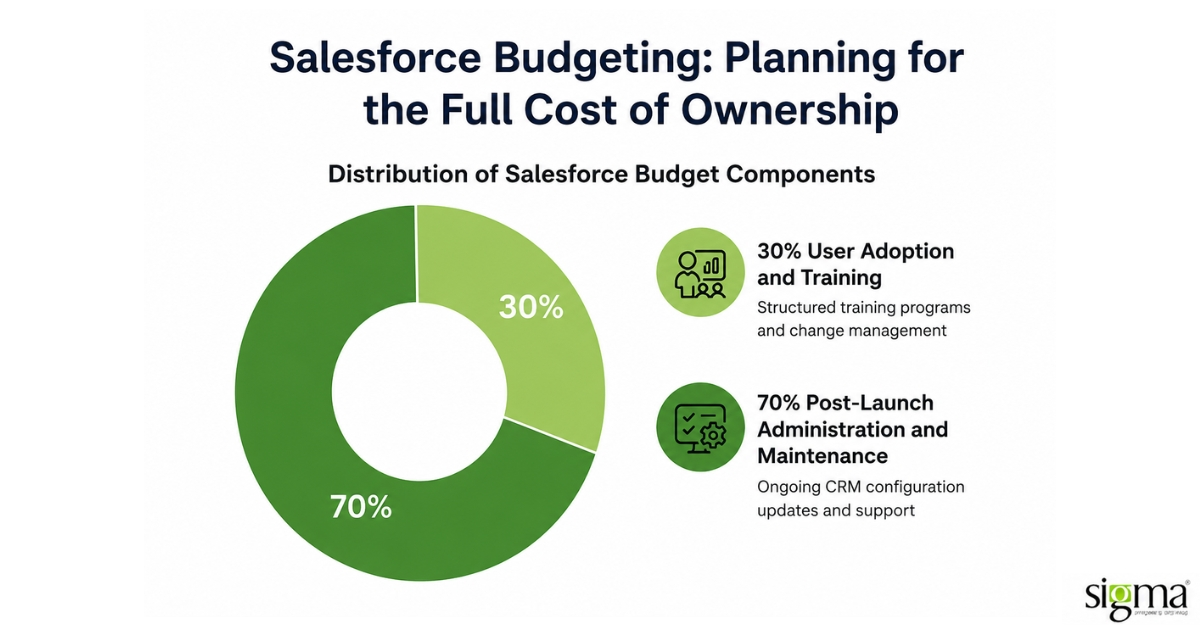
Salesforce Budgeting: Planning for the Full Cost of Ownership
User Adoption and Training
A Salesforce instance that is technically complete but poorly adopted delivers minimal business value. User training is a direct cost that many organizations underestimate when building their initial Salesforce budget. Structured training programs, including role-based training for sales representatives, managers, and administrators, typically add $5,000 to $20,000 to project costs, depending on team size and the complexity of the workflows being trained.
Beyond formal training, user adoption programs include change management activities such as stakeholder communications, feedback loops during rollout, and documentation of standard operating procedures within the platform. These activities require dedicated time from both internal project sponsors and external consultants, and their absence is one of the primary reasons Salesforce deployments fail to deliver expected outcomes despite technically successful go-lives.
Post-Launch Administration and Maintenance
Salesforce is not a deploy-and-forget platform. As business processes evolve, the CRM configuration must be updated to reflect new sales stages, product lines, reporting requirements, and regulatory changes. Organizations without a dedicated Salesforce administrator typically rely on their implementation partner for ongoing support, which adds a recurring monthly cost to the total investment.
A realistic post-launch administration budget ranges from $2,000 to $8,000 per month, depending on the size of the deployment and the frequency of change requests. This cost should be included in any total cost of ownership analysis during the pre-implementation planning phase, not discovered after go-live when the budget has already been committed.
How Sigma Infosolutions Helps Businesses Control Salesforce Implementation Costs
Many Salesforce projects exceed budget not because of the platform itself but because implementation planning, integration architecture, and operational workflows are not aligned early in the project lifecycle. Sigma Infosolutions approaches Salesforce CRM implementation with a delivery model focused on reducing deployment friction, improving system scalability, and helping businesses achieve long-term operational value from their CRM investment.
Business-First CRM Discovery and Solution Mapping
Sigma begins engagements with structured discovery workshops that align Salesforce configuration with real business processes, reporting requirements, and workflow dependencies. This approach helps reduce scope ambiguity, avoid unnecessary customization, and improve implementation accuracy before development begins.
Integration-Centric Salesforce Architecture
Modern CRM environments rarely operate in isolation. Sigma designs Salesforce ecosystems that integrate with ERP platforms, e-commerce systems, lending platforms, customer support tools, and marketing applications to create connected operational workflows and unified customer visibility across systems.
Scalable Delivery with Cost-Efficient Execution
Sigma combines North America-based account management with cost-efficient engineering execution to help businesses manage Salesforce implementation costs without compromising delivery quality. This model supports faster deployments, controlled consulting spend, and scalable implementation support across growing CRM environments.
Security and Governance for Enterprise CRM Environments
For businesses handling regulated customer and financial data, Sigma incorporates structured governance practices throughout the implementation lifecycle, including access management, secure data handling workflows, and integration security reviews aligned with ISO/IEC 27001:2022 standards.
Conclusion
Salesforce implementation cost in 2026 is shaped by far more than software licensing alone. CRM customization, integration architecture, data migration, user adoption, governance requirements, and long-term administration all influence the total cost of ownership and the success of the deployment itself. Businesses that approach Salesforce budgeting with a structured implementation strategy are better positioned to avoid scope overruns, improve deployment efficiency, and maximize long-term CRM value.
Whether the goal is modernizing sales operations, integrating disconnected business systems, or scaling customer engagement workflows, successful Salesforce implementations require careful planning across both technical and operational dimensions. Working with an experienced Salesforce consulting partner helps organizations build scalable CRM environments while maintaining greater visibility into implementation timelines, integration complexity, and ongoing support costs.
Sigma Infosolutions helps businesses design, implement, and optimize Salesforce ecosystems with a focus on scalability, integration efficiency, and long-term operational performance across evolving enterprise workflows.
Optimize Your CRM Investment with Salesforce Services.
Frequently Asked Questions
Q: What is the average Salesforce implementation cost for a mid-sized company?
A: For a mid-market company deploying Sales Cloud to 11 to 50 users, total implementation costs, including consulting, data migration, and basic integrations, typically range from $25,000 to $80,000. Annual license fees are an additional cost and depend on the edition and number of users selected.
Q: How does Salesforce pricing differ between editions?
A: Salesforce pricing varies significantly by edition: Starter is around $25 per user per month, Professional is approximately $80, Enterprise is $165, and Unlimited is $330. The edition required depends on the business processes being supported and the level of customization needed.
Q: What is included in CRM implementation costs beyond the license?
A: CRM implementation costs include consulting fees for configuration and customization, data migration from legacy systems, integration development with connected platforms, user training, and post-launch administration. These components often exceed the first year’s license cost for mid-market and enterprise deployments.
Q: How should businesses approach Salesforce budgeting before starting a project?
A: Salesforce budgeting should begin with a documented requirements analysis that covers the number of users, business processes to be configured, systems requiring integration, and data volumes to be migrated. This analysis allows a certified partner to provide accurate cost estimates rather than broad ranges.
Q: How long does a standard Salesforce implementation take?
A: A standard Sales Cloud implementation for a mid-market company typically takes 8 to 20 weeks from kickoff to go-live. Enterprise-scale deployments involving multiple clouds or complex integrations can extend timelines to 6 months or longer.
Q: Can offshore delivery reduce Salesforce implementation cost?
A: Yes, hybrid delivery models that combine onshore consulting with offshore engineering can reduce implementation costs by 25% to 40% compared to fully onshore engagements. The quality of the outcome depends on the seniority of the architects involved, not the delivery location.
Q: What ongoing costs should be included in a Salesforce budget?
A: Post-launch costs include Salesforce administration, which ranges from $2,000 to $8,000 per month, as well as annual license renewals, user training for new hires, and periodic configuration updates. These recurring costs should be factored into the total cost of ownership before the initial investment decision is made.
Q: Is Salesforce budgeting different for companies in regulated industries?
A: Yes, regulated industries such as financial services and healthcare typically face higher implementation costs due to compliance validation requirements, additional security configuration, and data handling protocols that must be reviewed and approved during the project. Working with a partner that holds security certifications such as ISO/IEC 27001 reduces the risk of compliance gaps in the final deployment.