Salesforce Performance Issues? How Salesforce Scale Center Helps You Identify and Fix Them
Key Highlights:
- As Salesforce environments grow, fragmented automations, integrations, and legacy customizations create hidden performance bottlenecks that slow business operations, reduce user productivity, and increase operational costs.
- Salesforce Scale Center provides a centralized view of org health, enabling teams to quickly identify performance issues, pinpoint root causes, validate optimization efforts, and keep Salesforce operating efficiently as the business scales.
- Performance insights create value only when they lead to action. Sigma combines Salesforce architecture optimization, automation rationalization, integration modernization, and ongoing performance engineering to transform Scale Center findings into a scalable, high-performing Salesforce ecosystem.
- Organizations can proactively optimize Salesforce performance, improve user experience, accelerate business processes, and support long-term growth without accumulating technical debt or operational inefficiencies.
Introduction
Is Your Salesforce Org Slowing Down as Your Business Grows?
As organizations expand, Salesforce often becomes the backbone of sales, customer service, and day-to-day operations. But with every new integration, workflow, customization, and data source, the platform becomes more complex to manage. Over time, this complexity can lead to slower response times, inconsistent user experiences, delayed reporting, and operational inefficiencies that impact both employees and customers.
The real challenge isn’t recognizing that something has changed—it’s understanding where the slowdown originates and which optimization efforts will deliver the greatest impact. Without clear visibility into platform health, teams often spend valuable time investigating symptoms instead of addressing the underlying architectural or operational issues.
Salesforce Scale Center brings performance monitoring, investigation, and analysis into a centralized experience. It enables organizations to identify bottlenecks, validate optimization efforts, and make informed decisions that improve platform reliability, user experience, and long-term long-term scalability .
Why Salesforce Scale Center Matters
Instead of waiting for performance issues to affect critical operations, organizations can use Scale Center to:
- Monitor overall org health through a centralized performance dashboard.
- Detect unusual activity before it affects users.
- Investigate bottlenecks across automations, integrations, database activity, and workflows.
- Compare platform behavior before and after releases or major configuration changes.
- Prioritize optimization initiatives using measurable performance insights rather than assumptions.
By turning performance data into actionable insights, Salesforce Scale Center helps organizations maintain a reliable, scalable platform that supports continued growth.
How Salesforce Scale Center Helps Resolve Performance Bottlenecks
Growing businesses depend on Salesforce to support sales, customer service, and business operations. But as organizations introduce new integrations, automate more workflows, expand data volumes, and customize operational workflows , maintaining platform performance becomes increasingly challenging.
The biggest obstacle isn’t knowing that Salesforce has slowed down—it’s understanding what changed, where the bottleneck exists, and how to resolve it before productivity and customer experience are affected. Salesforce Scale Center helps organizations move beyond reactive troubleshooting by providing the visibility needed to identify performance issues, investigate root causes, and prioritize optimization efforts.
1. When Salesforce Slows Down, Finding the Cause Is Usually the Hardest Part
As the Salesforce ecosystem becomes more complex, performance issues rarely stem from a single source. New automations, third-party integrations, growing data volumes, and custom business processes can gradually impact system performance. Without a centralized view, technology teams often spend valuable time reviewing multiple reports and responding to user complaints before identifying the real issue.
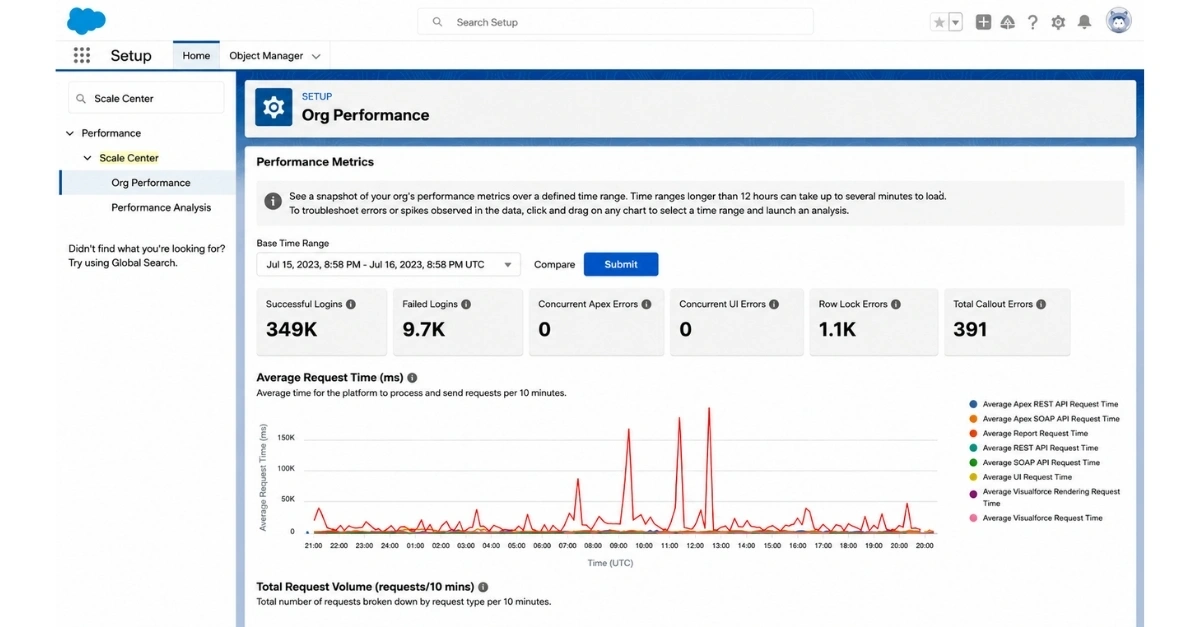
The Org Performance page provides a centralized snapshot of Salesforce health for a selected time period. Summary cards surface important operational signals such as successful and failed logins, concurrent Apex errors, concurrent UI errors, row-lock errors, and callout errors.
Time-series charts display request time, request volume, database CPU utilization, login activity, and error trends, helping organizations quickly identify unusual performance spikes and determine exactly when system behavior changed.
WHY IT MATTERS
Instead of relying on user complaints to uncover performance issues, organizations gain continuous visibility into Salesforce health, allowing them to identify problems early and prioritize optimization before they impact business operations.
Investigate Performance Issues Before They Impact Business Operations
Knowing Salesforce is experiencing performance issues is only the first step. The greater challenge is identifying which business process, integration, automation, or transaction is creating the bottleneck.
Salesforce Scale Center allows organizations to investigate a specific performance spike and connect it directly to the processes generating the highest system load, significantly reducing the time required to move from symptoms to actionable insights.
Slow Customer Transactions Often Point to Database Bottlenecks
When sales teams experience delayed opportunity updates, customer onboarding takes longer than expected, or business-critical workflows begin slowing down, database performance is often one of the first areas that requires investigation.
Instead of manually reviewing hours of logs, Salesforce Scale Center enables organizations to isolate the affected period and generate a focused Database Performance analysis.
Step 1: Navigate to the Database CPU Chart
Open Org Performance, select the relevant time range, and review Total DB CPU Time. Compare database activity with login volume and error trends to identify periods where performance significantly deviates from the normal baseline.
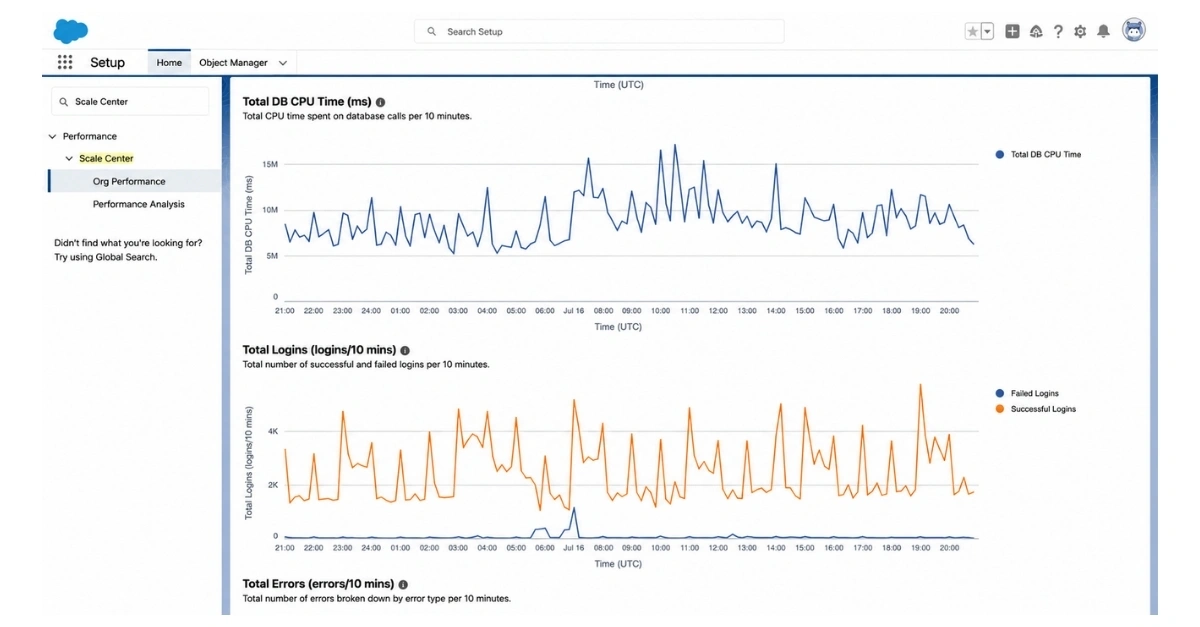
2. Highlight the spike
Click and drag across the chart to highlight the time window you want to investigate. Scale Center aligns the selected period across related charts, so you can quickly see whether CPU, login, or error activity changed at the same time.
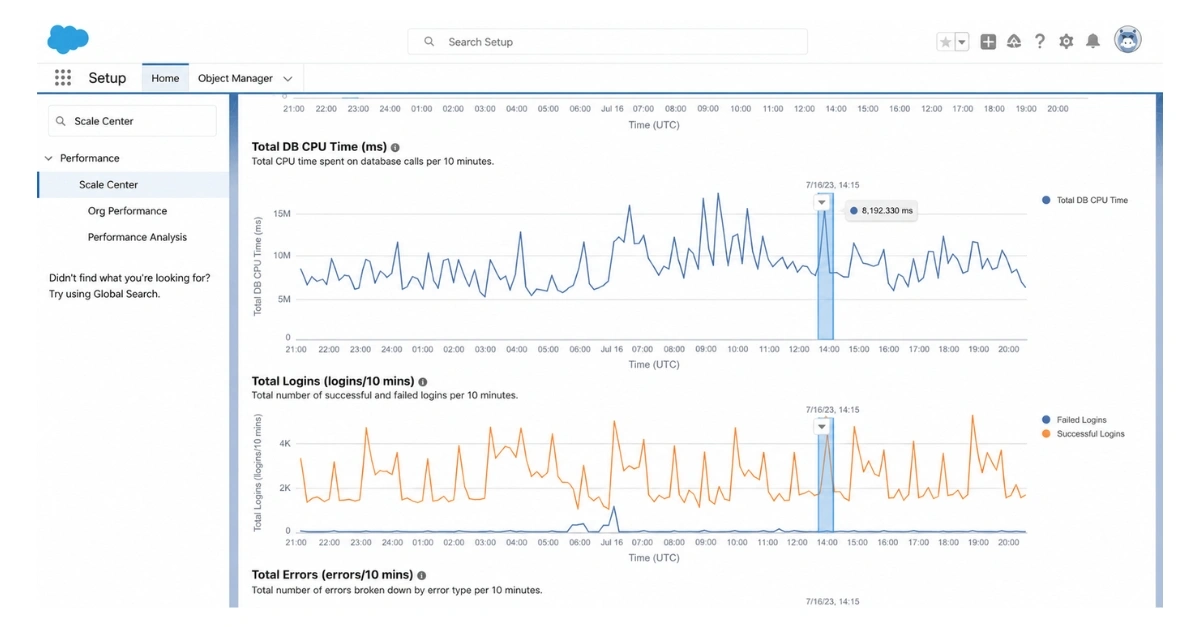
Step 2: Highlight the Performance Spike
Select the affected time window directly from the chart. Scale Center automatically aligns the selected period across related performance metrics, making it easier to understand whether increases in CPU usage, user activity, or system errors occurred simultaneously.
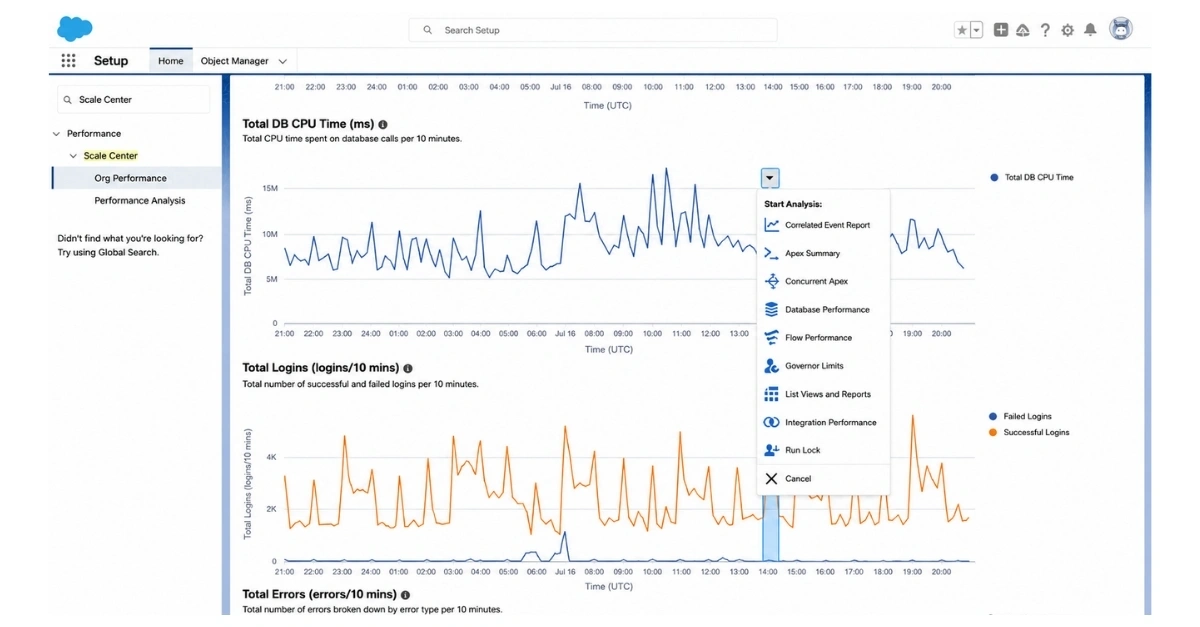
Step 3: Generate a Database Performance Analysis
Choose Database Performance from the analysis menu. Additional investigation options include Apex Summary, Concurrent Apex, Flow Performance, Governor Limits, Integrations Performance, List Views and Reports, and Row Lock.
Assign a report name and select Start Report Analysis.
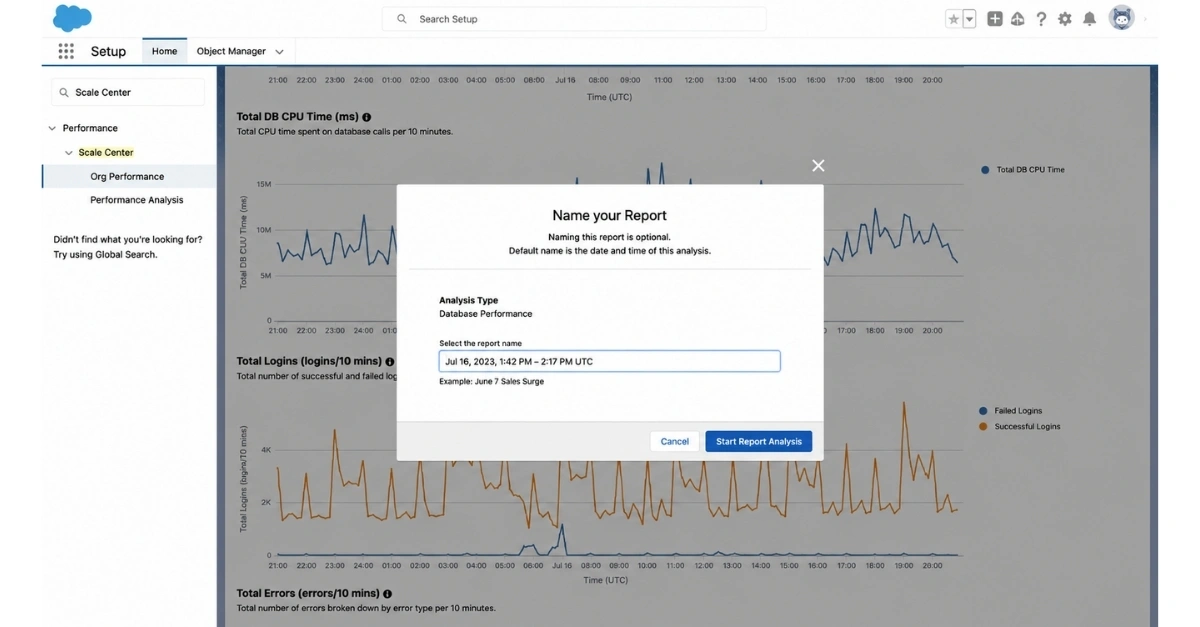
Step 4: Review the Generated Report
Navigate to the Performance Analysis tab once the report status changes to Available. Reports are organized by analysis type, requester, status, and selected time period, making it easier to manage ongoing investigations or compare multiple performance events.
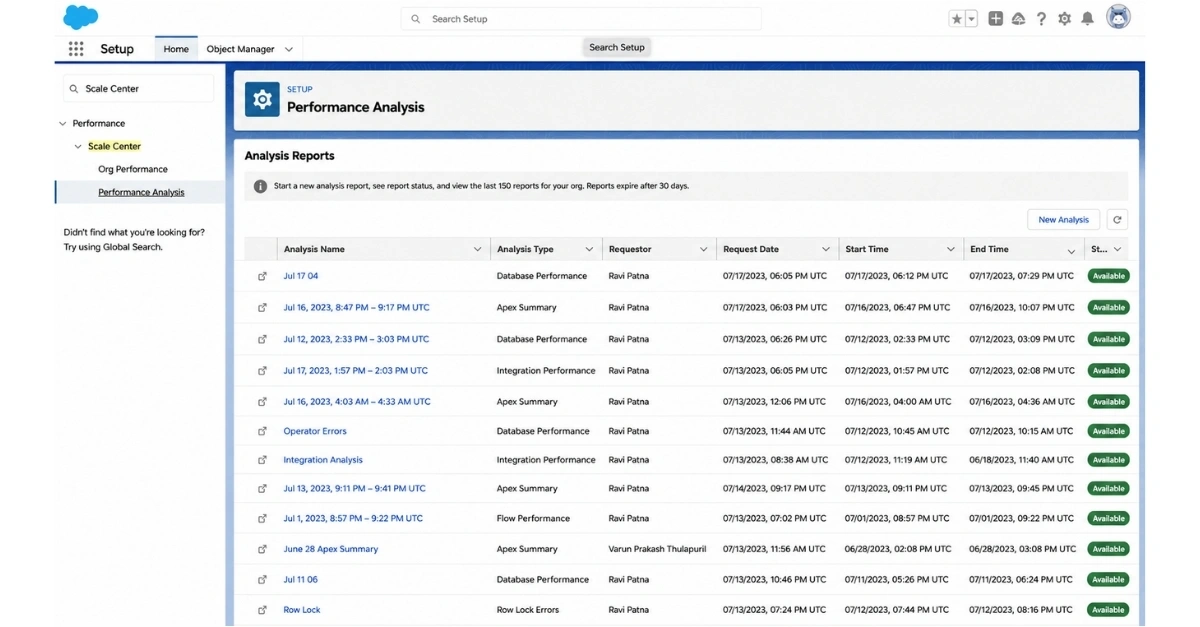
Step 5: Prioritize the Highest-Impact Optimizations
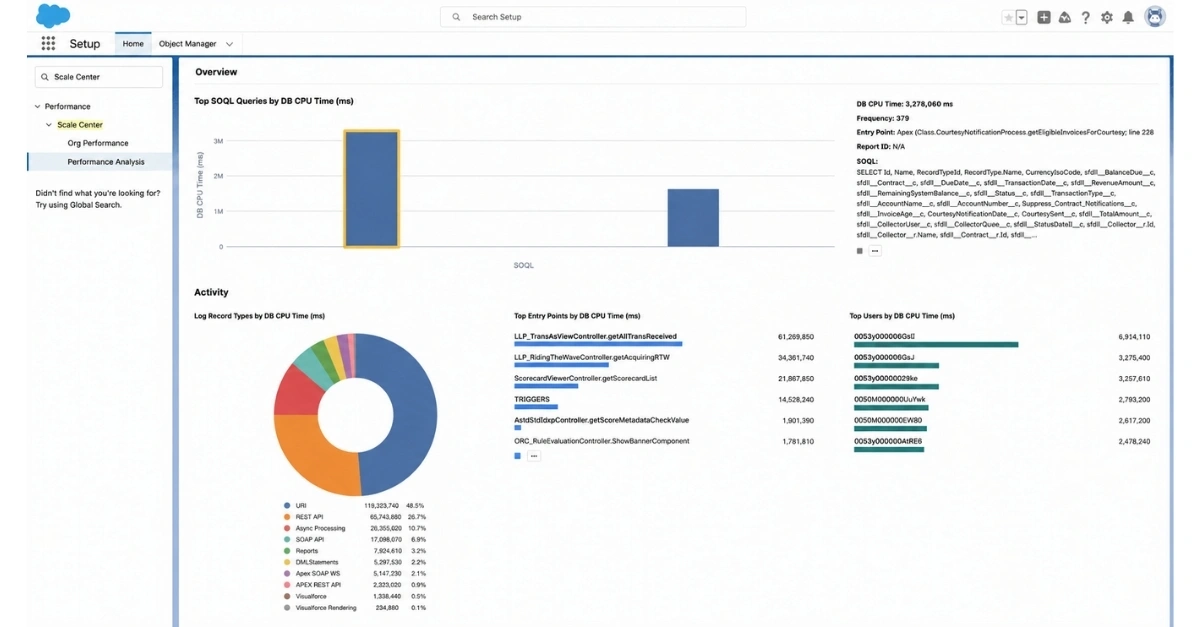
Begin by reviewing Top SOQL Queries by DB CPU Time, followed by entry points, users, record types, and DML activity. Rather than attempting to optimize everything, organizations can focus on the transactions creating the greatest impact on platform performance and team productivity .
Did Your Last Salesforce Release Improve Performance—Or Make It Worse?
Every new Salesforce release, integration, workflow, or business process has the potential to improve efficiency—or introduce new performance bottlenecks. Without historical comparison, it becomes difficult to determine whether recent changes have strengthened or weakened overall system performance.
Salesforce Scale Center allows organizations to compare two different time periods side by side, making it easier to validate deployments, assess peak business periods, and measure whether optimizing strategic initiatives have delivered measurable improvements.
How to Compare Time Periods in Salesforce Scale Center
- Select the primary time range from the Org Performance page.
- Enable Compare and choose the comparison period.
- Generate the comparison view.
- Review differences in request time, database CPU utilization, login activity, and system errors.
- Use significant deviations as the starting point for a focused Performance Analysis report.
Rather than relying on assumptions, organizations can use measurable performance insights to validate platform optimization efforts, reduce operational risk, and ensure Salesforce continues to support business growth..
Read our success story: Boosting Lead Conversion Through Salesforce Account Engagement
Prevent Technical Debt from Becoming a Business Bottleneck
As Salesforce evolves with new business processes, integrations, and customizations, technical debt can quietly accumulate. Inefficient Apex code, redundant methods, and resource-intensive database operations may not cause immediate failures, but over time they can slow critical business processes, increase maintenance effort, and make future enhancements more complex and expensive.
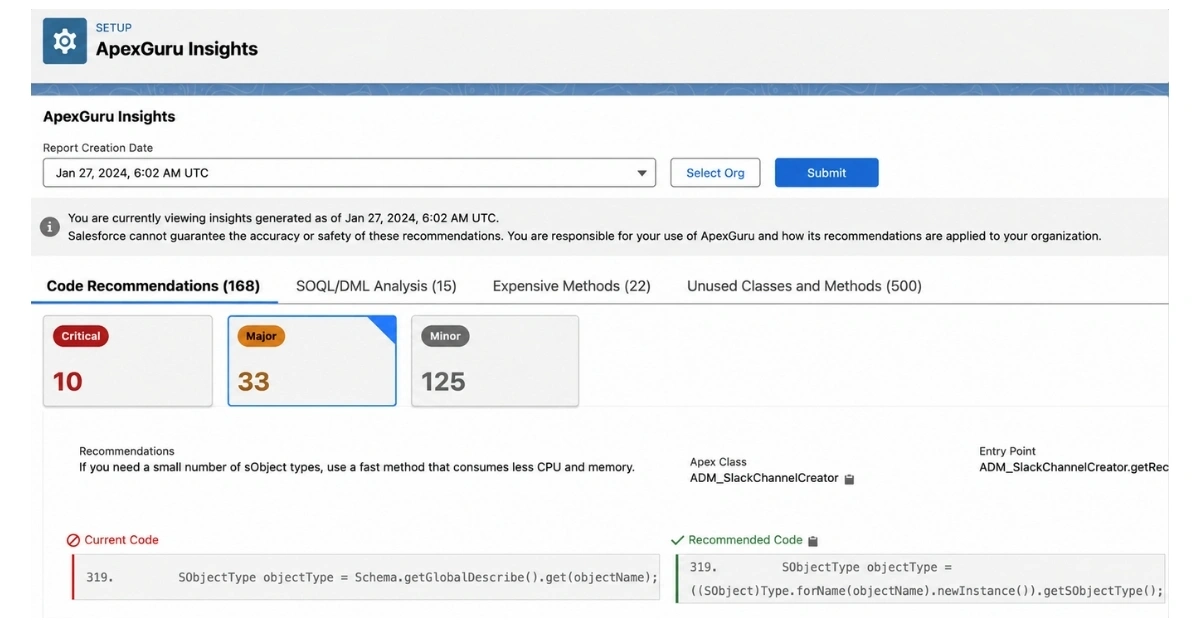
ApexGuru Insights helps organizations proactively identify opportunities to improve Salesforce performance by analyzing Apex runtime behavior and highlighting recommendations that support greater scalability, maintainability, and operational efficiency. Instead of manually reviewing large codebases, teams can focus on the areas having the greatest impact on overall platform performance .
The experience includes Code Recommendations, SOQL/DML Analysis, Expensive Methods, and Unused Classes and Methods. Each recommendation provides visibility into the affected Apex class, the entry point where the behavior occurs, and suggested improvements, enabling organizations to prioritize optimization efforts that deliver measurable long-term platform value .
Read the blog: Salesforce Account Engagement: Fix Disconnected Marketing and Sales Before They Cost You Revenue
Getting Started with Salesforce Scale Center
Improving Salesforce performance starts with understanding how your Salesforce environment behaves under real business workloads. Once Scale Center is enabled, organizations can begin org health monitoring performance trends, investigating bottlenecks, and identifying optimization opportunities before they impact users or business operations.
How to Access Salesforce Scale Center
- Open Setup.
- Enter Scale Center in the Quick Find box.
- Select Scale Center or Org Performance under Performance.
- Enable Scale Center if it is not already active for your Salesforce org.
- Allow performance metrics to populate, then select a time range to begin monitoring your Salesforce environment.
Beyond Monitoring: Building a High-Performing Salesforce Environment
Salesforce Scale Center helps organizations identify performance bottlenecks, but resolving them requires a broader strategy than monitoring alone. As businesses grow, Salesforce must support increasing users, evolving business processes, expanding integrations, and continuous innovation without compromising performance or user experience.
For organizations seeking long-term Salesforce success, optimization extends beyond fixing isolated issues. It requires a scalable platform architecture that aligns technology investments with organizational growth.
Common Challenges That Limit Salesforce Performance
Growing organizations often experience performance and scalability platform bottlenecks because of:
- Legacy customizations that no longer support evolving business processes.
- Disconnected third-party integrations creating data inconsistencies and operational delays.
- Complex automation workflows that increase maintenance effort and reduce platform efficiency.
- Technical debt accumulated through years of incremental enhancements.
- Limited visibility into CRM platform performance and optimization opportunities.
These challenges rarely appear overnight, but they can gradually affect productivity, customer experience, and the ability to scale Salesforce alongside the business.
Addressing Salesforce performance requires more than resolving individual incidents. Organizations need a strategic approach that evaluates platform architecture, simplifies business processes, modernizes integrations, optimizes automation, and establishes governance practices that support long-term scalability.
This is where experienced Salesforce consulting becomes a business enabler rather than simply a technical service.
How Strategic Salesforce Consulting Extends the Value of Scale Center
Organizations often discover that identifying a performance bottleneck is only the beginning. Sustainable improvements require architectural decisions that simplify automation, modernize integrations, improve platform governance, and reduce technical debt.
Sigma Infosolutions works with growth-stage and mid-market organizations to translate Salesforce performance insights into long-term platform improvements. By combining Salesforce consulting with enterprise product engineering, Sigma helps organizations modernize complex Salesforce environments, optimize integrations, streamline automation, and build scalable architectures that continue supporting business growth.
Build a Salesforce Environment That Scales with Your Business
Salesforce Scale Center gives organizations the visibility to identify performance bottlenecks, validate optimization efforts, and make data-driven decisions about platform health . But sustainable performance comes from addressing the architectural, integration, and automation challenges that cause those bottlenecks in the first place.
As businesses grow, Salesforce environments require continuous optimization to support increasing workloads, evolving business processes, and expanding customer expectations. Organizations that invest in proactive Salesforce architecture, performance optimization, and platform modernization are better equipped to improve user productivity, accelerate day-to-day operations , and maximize the long-term value of their Salesforce investment.
Organizations that continuously optimize Salesforce architecture—not just monitor it—are better positioned to improve user productivity, accelerate customer-facing processes, and maximize long-term platform value. Combined with strategic Salesforce consulting and product engineering expertise from Sigma Infosolutions, Salesforce Scale Center becomes more than a monitoring tool—it becomes the starting point for building a resilient, scalable Salesforce ecosystem that grows with the business.
Turn Salesforce Performance Insights into Scalable Business Growth.
FAQs
What is Salesforce Scale Center?
Salesforce Scale Center is a performance monitoring and analysis tool that provides a centralized view of your Salesforce org’s health. It helps identify performance bottlenecks, investigate root causes, compare system performance over time, and validate optimization efforts before they impact business operations.
How does Salesforce Scale Center help improve Salesforce performance?
Scale Center continuously monitors metrics such as request time, database CPU utilization, login activity, automations, integrations, and system errors. By highlighting performance anomalies and their root causes, it enables teams to prioritize the optimizations that deliver the greatest business impact.
What causes Salesforce performance issues in growing organizations?
Common causes include complex automations, legacy customizations, disconnected third-party integrations, increasing data volumes, inefficient Apex code, and accumulated technical debt. As Salesforce environments evolve, these factors can reduce platform performance and user productivity.
Can Salesforce Scale Center identify the root cause of performance bottlenecks?
Yes. Salesforce Scale Center allows administrators to investigate performance spikes by analyzing database activity, Apex execution, flows, integrations, governor limits, row locks, and other platform metrics. This helps teams move from symptoms to actionable insights much faster.
How can I compare Salesforce performance before and after a release?
Salesforce Scale Center lets you compare two different time periods side by side. This makes it easier to validate new releases, integrations, or configuration changes by measuring differences in request time, database CPU utilization, login activity, and system errors.
Is Salesforce Scale Center enough to optimize Salesforce performance?
No. While Scale Center identifies performance issues, long-term improvements require Salesforce architecture optimization, automation rationalization, integration modernization, governance, and technical debt reduction. Strategic Salesforce consulting helps turn performance insights into lasting platform improvements.
How do Salesforce consulting services improve platform scalability?
Salesforce consulting services evaluate your platform architecture, simplify complex automations, modernize integrations, improve governance, and optimize performance. These improvements help Salesforce support business growth without compromising reliability or user experience.
When should an organization optimize its Salesforce architecture?
Organizations should optimize Salesforce architecture proactively as user adoption, integrations, customizations, and business processes grow. Addressing architectural challenges early helps prevent technical debt, improve operational efficiency, and ensure Salesforce scales with the business.