How to Set Up a CI/CD Pipeline on AWS: A Step-by-Step Guide
Key Highlights
- Engineering teams operating without a structured CI/CD pipeline on AWS face slow release cycles, inconsistent deployment quality, and mounting technical risk as manual processes introduce human error, environment drift, and coordination overhead that compounds with every new feature shipped.
- A well-architected AWS CI/CD pipeline automates the full software delivery lifecycle from code commit through testing, security scanning, and production deployment, enabling engineering teams to ship faster, with greater confidence and lower operational risk at every stage of the release process.
- Sigma Infosolutions implements production-grade CI/CD pipelines, DevOps automation workflows, and AWS-native delivery infrastructure that helps engineering teams accelerate release velocity, improve deployment quality, and build the operational discipline that scales with their product and organization.
Introduction
Software delivery speed has become a defining competitive dimension for technology organizations in 2026. Engineering teams that can ship features, fixes, and improvements quickly and reliably have a structural advantage over those whose release cycles are slowed by manual processes, fragile deployment scripts, and coordination bottlenecks that accumulate as the codebase and team grow. The CI/CD pipeline is the infrastructure that makes high-velocity, high-quality software delivery possible at scale.
AWS CI/CD provides a comprehensive set of native tools that cover every stage of the software delivery lifecycle, from source code management and automated build orchestration through testing automation, artifact management, and deployment execution across diverse infrastructure targets. When these tools are integrated into a cohesive pipeline, they eliminate the manual handoffs and environment inconsistencies that slow delivery and introduce risk, replacing them with an automated, repeatable process that behaves identically every time it runs.
For DevOps engineers designing delivery infrastructure, for engineering managers responsible for release quality and team productivity, and for CTOs evaluating the maturity of their organization’s software delivery capabilities, this guide provides a practical, step-by-step framework for building a production-grade CI/CD pipeline on AWS. The guide covers the core AWS tools involved, the architectural decisions that determine pipeline effectiveness, and the implementation steps that transform a manual deployment process into an automated delivery system.
Read the blog: How AWS DevOps Pipelines Reduce Rollbacks in High-Traffic Production Environments
Why AWS Is a Strong Foundation for CI/CD Implementation
AWS provides a native CI/CD toolchain that integrates deeply with the broader AWS ecosystem and eliminates many of the compatibility and credential management challenges that arise when combining third-party CI/CD tools with AWS deployment targets. The native integration between AWS CodePipeline, CodeBuild, CodeDeploy, and the services they deploy means that teams can build a complete delivery pipeline without managing complex authentication configurations or dealing with the limitations of tools that were designed for cloud-agnostic environments.
Beyond its native toolchain, AWS provides the infrastructure services that modern CI/CD architectures depend on, including elastic compute for build execution, managed container registries for artifact storage, secrets management for secure credential handling, and monitoring and alerting services that give teams visibility into pipeline performance and failure patterns.
AWS also provides the compliance and audit capabilities that regulated industries require, including CloudTrail logging of all pipeline API activity, fine-grained IAM access controls that govern who can trigger, modify, and approve pipeline stages, and integration with AWS Security Hub for automated security scanning within the delivery process. For fintech platforms, healthcare technology organizations, and SaaS enterprises operating under compliance frameworks, these capabilities make AWS a particularly well-suited foundation for enterprise-grade CI/CD implementation.
Core AWS Tools in a CI/CD Pipeline
Before walking through the implementation steps, it is important to understand the role each core AWS tool plays in the pipeline architecture.
AWS CodeCommit
AWS CodeCommit is a managed source control service that hosts Git repositories within the AWS environment. It integrates natively with other AWS services and eliminates the need to manage self-hosted Git infrastructure or configure external repository access for AWS services. CodeCommit repositories can trigger pipeline executions automatically when code is pushed to defined branches, making them a natural starting point for AWS-native CI/CD architectures.
Organizations that prefer to use GitHub, GitLab, or Bitbucket as their source control platform can connect these repositories to AWS CodePipeline using native source action integrations, maintaining their existing source control workflows while taking advantage of AWS-native build and deployment capabilities downstream in the pipeline.
AWS CodeBuild
AWS CodeBuild is a fully managed build service that compiles source code, runs automated tests, and produces deployment artifacts in isolated, ephemeral build environments. CodeBuild environments are defined using buildspec.yml files that specify the build commands, environment variables, and artifact output locations for each build project.
Because CodeBuild environments are provisioned on demand and terminated after each build completes, they eliminate the environment drift and maintenance overhead associated with self-managed build servers. Build environments can be configured with custom Docker images that include the specific language runtimes, testing frameworks, and build tools required by each project, ensuring consistency across every build execution.
AWS CodeDeploy
AWS CodeDeploy automates the deployment of application artifacts to EC2 instances, Lambda functions, ECS containers, and on-premises servers. It supports multiple deployment strategies including in-place deployment, blue/green deployment, canary deployment, and linear deployment, giving engineering teams the flexibility to choose the strategy that best balances deployment speed against risk for each application and environment.
CodeDeploy deployment configurations are defined using appspec.yml files that specify the deployment lifecycle hooks, file mappings, and validation scripts that govern how each deployment proceeds. Deployment hooks enable teams to run health checks, database migrations, cache warming operations, and smoke tests at specific points in the deployment lifecycle, ensuring that the application is fully operational before traffic is shifted to the new version.
AWS CodePipeline
AWS CodePipeline is the orchestration layer that connects source, build, test, and deployment stages into a cohesive, automated delivery workflow. A pipeline definition specifies the sequence of stages and the actions within each stage, along with the conditions that must be satisfied for execution to proceed from one stage to the next.
CodePipeline supports manual approval actions that insert a human review gate between pipeline stages, enabling teams to require explicit sign-off before changes are deployed to production environments. It also supports parallel action execution within stages, allowing multiple test suites or deployment targets to be processed simultaneously rather than sequentially, reducing total pipeline execution time.
AWS Elastic Container Registry
AWS Elastic Container Registry is a managed Docker container registry that stores, versions, and distributes container images within the AWS environment. For containerized applications, ECR serves as the artifact repository between the build stage, where images are created and pushed, and the deployment stage, where images are pulled and deployed to ECS, EKS, or Lambda container targets.
ECR integrates with AWS Identity and Access Management for fine-grained access control and supports image scanning powered by Amazon Inspector that identifies known vulnerabilities in container images before they are deployed to production.
Step-by-Step Guide to Setting Up an AWS CI/CD Pipeline
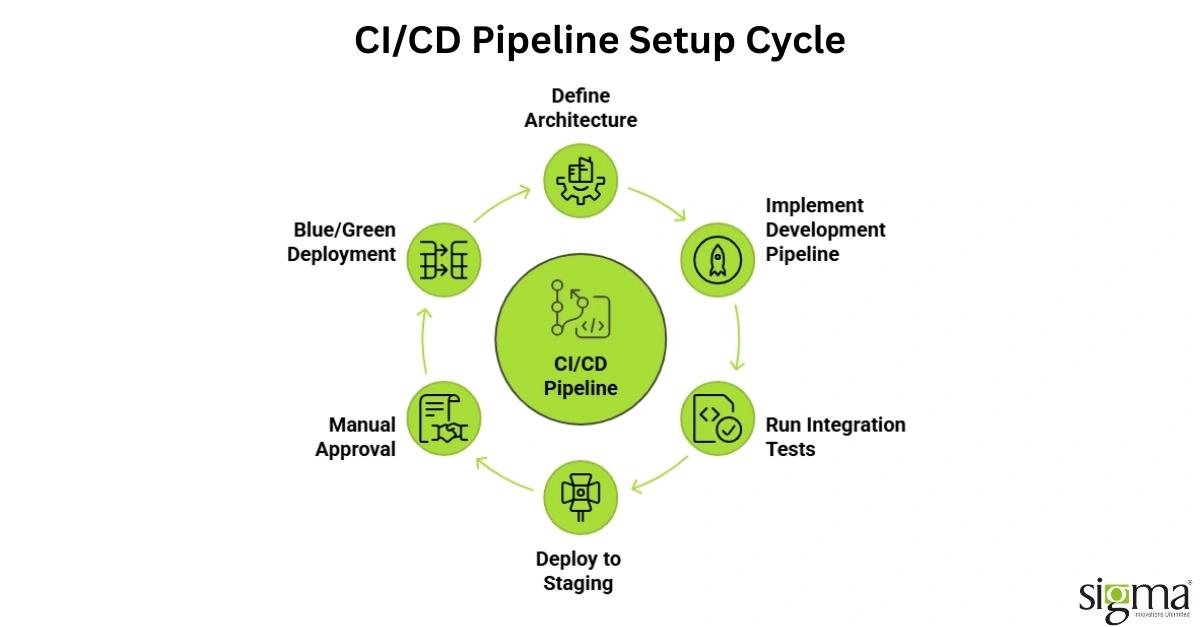
The following steps provide a practical implementation guide for setting up a production-grade AWS CI/CD pipeline for a containerized application deployed to Amazon ECS. The same architectural principles apply to other deployment targets with adjustments to the deployment stage configuration.
Step One: Define Your Pipeline Architecture and Branch Strategy
Before writing any configuration, the engineering team should define the pipeline architecture that matches the organization’s deployment model. This includes deciding how many pipeline stages are required, which environments each stage targets, what testing and approval gates are required between stages, and how the branch strategy in source control maps to pipeline executions.
A common architecture for production AWS CI/CD pipelines includes a development pipeline that triggers on commits to the main branch and deploys to a development environment, a staging pipeline that triggers on release branch creation and deploys to a staging environment after automated integration tests pass, and a production pipeline that requires manual approval before deploying to production and executes a blue/green deployment strategy to minimize deployment risk.
Defining this architecture explicitly before implementation prevents the ad hoc accumulation of pipeline stages that leads to pipelines that are difficult to understand, maintain, and debug.
Step Two: Configure Your Source Repository and Trigger
Create a CodeCommit repository for the application or connect an existing GitHub or GitLab repository to CodePipeline using the appropriate source action integration. Configure branch-based triggers that initiate pipeline execution automatically when code is pushed to the branches associated with each pipeline.
For GitHub integrations, use the CodeStar Connections service to establish a secure, token-based connection between CodePipeline and the GitHub organization. This connection method is more secure and easier to maintain than personal access token integrations and supports fine-grained repository access controls.
Step Three: Create the CodeBuild Build Project
Create a CodeBuild project that defines the build environment and execution instructions for the application. The build environment should specify the base Docker image, compute type, and environment variables required for the build. For containerized applications, the build environment should include Docker daemon access to support image building.
Create a buildspec.yml file in the root of the application repository that defines the build phases and commands. A typical buildspec.yml for a containerized application includes a pre-build phase that logs into ECR and sets environment variables, a build phase that runs unit tests, builds the Docker image, and tags it with the commit hash and environment label, and a post-build phase that pushes the image to ECR and generates the artifact files required by the deployment stage.
Store sensitive build environment variables such as database connection strings, API keys, and service credentials in AWS Secrets Manager or AWS Systems Manager Parameter Store and reference them in the buildspec.yml using the secrets-manager or parameter-store environment variable sources rather than embedding them in plaintext in the buildspec file or pipeline configuration.
Step Four: Configure Automated Testing Stages
Automated testing is the quality gate that gives CI/CD pipelines their value. A pipeline that automates deployment without automating quality validation simply accelerates the delivery of untested code, which is worse than a slow manual process.
Configure separate CodeBuild projects for each category of automated test, including unit tests, integration tests, and end-to-end tests, and add them as distinct pipeline actions or stages with clear success and failure criteria. Unit tests should run in the build stage as part of the primary build project. Integration tests that require a running application environment should run as a separate stage after the application has been deployed to the development environment.
Static analysis tools, dependency vulnerability scanners, and container image scanners should be integrated as pipeline actions that run in parallel with or immediately after the build stage. AWS CodeGuru Reviewer provides AI-powered code review for Java and Python applications and can be integrated into the pipeline to identify code quality issues before they reach a human reviewer.
Step Five: Set Up the Deployment Stage with CodeDeploy
Create a CodeDeploy application and deployment group that targets the ECS service or EC2 Auto Scaling group where the application runs. Configure the deployment strategy based on the risk tolerance and availability requirements of the target environment.
For production deployments, blue/green deployment with a canary traffic shifting configuration is the recommended approach. This strategy creates a new deployment set alongside the existing production environment, shifts a small percentage of production traffic to the new version, monitors defined health metrics during the evaluation period, and either completes the traffic shift if health metrics remain within acceptable bounds or rolls back automatically if anomalies are detected.
Create an appspec.yml file that defines the ECS task definition and container image references for the deployment, along with any lifecycle hook functions that should run at specific points in the deployment process.
Step Six: Implement Manual Approval Gates for Production
Add a manual approval action between the staging deployment stage and the production deployment stage in CodePipeline. Configure the approval action to send an Amazon SNS notification to the engineering manager or release team when a deployment is waiting for approval, including a link to the staging environment for review and the pipeline execution ID for traceability.
Manual approval gates ensure that a human reviews the staging environment behavior before production deployment proceeds, providing a critical safety check that automated testing alone cannot replace. The approval gate also creates a clear audit trail of who approved each production deployment and when, which is valuable for compliance reporting in regulated environments.
Step Seven: Configure Monitoring, Alerting, and Pipeline Observability
A CI/CD pipeline that runs without visibility into its performance and failure patterns is difficult to improve and slow to recover when problems occur. Configure Amazon CloudWatch metrics and alarms that monitor pipeline execution duration, stage failure rates, and deployment success rates across all environments.
Set up CloudWatch dashboards that give the engineering team a real-time view of pipeline health, including current execution status, recent failure patterns, and deployment frequency trends. Configure SNS notifications for pipeline failures that alert the relevant engineering team immediately when a stage fails, including the stage name, error message, and a direct link to the build logs in CloudWatch Logs.
Integrate AWS X-Ray tracing for applications that support distributed tracing to give the team visibility into the runtime behavior of each deployment, enabling faster diagnosis of performance regressions or functional issues that appear after deployment.
Step Eight: Implement Infrastructure as Code for Pipeline Configuration
Define the pipeline configuration, CodeBuild projects, CodeDeploy applications, and associated IAM roles using AWS CloudFormation or Terraform rather than configuring them manually through the AWS console. Infrastructure as code ensures that pipeline configurations are version-controlled, reproducible, and consistent across environments, and it enables the pipeline infrastructure itself to be reviewed, tested, and deployed through a change management process.
Store pipeline infrastructure code in a dedicated repository separate from application code, with its own pipeline that deploys pipeline infrastructure changes after peer review and automated validation.
Common CI/CD Pipeline Mistakes to Avoid
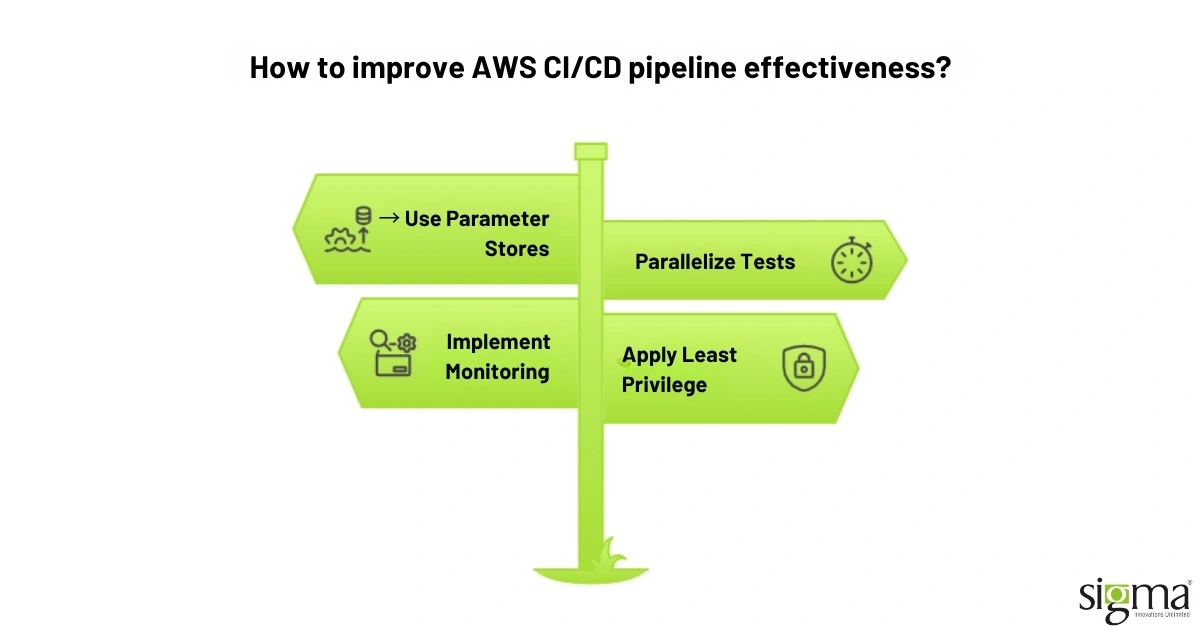
Engineering teams implementing AWS CI/CD pipelines for the first time frequently encounter a set of recurring mistakes that reduce pipeline effectiveness and create maintenance problems over time.
Hardcoding environment-specific configuration values in buildspec files or pipeline definitions creates pipelines that are fragile and difficult to promote across environments. Always use parameter stores and environment variables to manage configuration that differs between environments.
Building pipelines that run all tests sequentially rather than in parallel significantly increases total pipeline execution time and slows the feedback loop for developers waiting to see whether their changes have passed quality gates. Parallelize independent test suites wherever possible.
Neglecting pipeline monitoring and alerting means that failures go unnoticed until a developer manually checks the pipeline status. Automated alerting on pipeline failures is not optional in a production CI/CD environment.
Granting pipeline execution roles excessive IAM permissions in the interest of convenience creates a significant security risk. Apply least privilege principles to all pipeline IAM roles and review permissions regularly as part of the organization’s cloud security governance process.
How Sigma Infosolutions Implements AWS CI/CD for Engineering Teams
Sigma Infosolutions brings deep expertise in AWS DevOps, continuous deployment architecture, and cloud-native engineering to help organizations design and implement CI/CD pipelines that accelerate release velocity, improve deployment quality, and build the operational discipline that scaling technology products demand.
DevOps Assessment and Pipeline Design
Sigma begins every CI/CD engagement by assessing the client’s current software delivery process, identifying the bottlenecks, manual steps, and quality gaps that are limiting release velocity and confidence. This assessment produces a pipeline architecture design tailored to the organization’s specific technology stack, deployment targets, compliance requirements, and team structure.
Pipeline Implementation and Automation
Sigma’s AWS engineering team implements the full CI/CD pipeline using AWS-native tools and infrastructure as code practices that ensure the pipeline configuration is reproducible, version-controlled, and maintainable by the client’s engineering team after handover. Build projects, test automation integrations, deployment configurations, and approval workflows are all implemented as code rather than console configurations.
Security Integration and Compliance Hardening
Sigma integrates security scanning, vulnerability detection, and compliance validation into the pipeline as automated quality gates that prevent insecure or non-compliant code from reaching production. IAM roles, secrets management configurations, and audit logging are implemented according to AWS security best practices and the specific compliance requirements of the client’s operating environment.
Monitoring, Observability, and Ongoing Optimization
Sigma configures comprehensive pipeline monitoring, alerting, and observability tooling that gives engineering teams the visibility they need to maintain pipeline health, diagnose failures quickly, and continuously improve delivery performance over time.
Conclusion
Setting up a CI/CD pipeline on AWS is one of the highest-leverage investments an engineering organization can make in its software delivery capability. A well-implemented AWS CI/CD pipeline eliminates the manual coordination, environment inconsistency, and deployment risk that slow release cycles and undermine deployment confidence, replacing them with an automated, repeatable delivery process that scales with the product and the team.
The step-by-step framework covered in this guide, from pipeline architecture definition and source repository configuration through build automation, testing integration, deployment strategy selection, and monitoring implementation, provides the foundation for a production-grade continuous deployment capability that serves the organization’s delivery needs today and adapts as requirements evolve.
The difference between a CI/CD pipeline that is merely functional and one that genuinely transforms delivery velocity and quality lies in the architectural decisions, the depth of test automation, the rigor of security integration, and the quality of monitoring and observability that are built into the implementation from the beginning. These are the dimensions where experienced engineering partners make a decisive difference.
Sigma Infosolutions is the DevOps and AWS engineering partner that engineering teams, DevOps engineers, and CTOs trust to design and implement CI/CD pipelines that deliver real improvements in release velocity, deployment quality, and operational confidence.
FAQs
1. What is an AWS CI/CD pipeline?
An AWS CI/CD pipeline is an automated software delivery workflow that manages code integration, testing, deployment, and release processes using AWS DevOps tools.
2. Which AWS services are commonly used in CI/CD pipelines?
AWS CodePipeline, CodeBuild, CodeDeploy, CodeCommit, and Amazon ECR are the core services used to build scalable CI/CD pipelines on AWS.
3. How does CI/CD improve software deployment quality?
CI/CD improves deployment quality by automating testing, security checks, and release workflows, reducing human error and deployment failures.
4. Why should businesses implement CI/CD on AWS in 2026?
AWS CI/CD pipelines help businesses accelerate release cycles, improve application reliability, enhance security, and scale DevOps operations efficiently.
5. What are the benefits of AWS CodePipeline for DevOps teams?
AWS CodePipeline streamlines software delivery with automated workflows, faster deployments, integrated approvals, and seamless AWS service integration.
6. How does AWS Code Build support for continuous integration?
AWS CodeBuild automatically compiles source code, runs tests, builds artifacts, and creates consistent build environments without managing build servers.
7. What deployment strategies are supported in AWS CodeDeploy?
AWS CodeDeploy supports blue/green deployments, canary releases, rolling updates, and in-place deployments for safer production releases.
8. How does Sigma Infosolutions help with AWS CI/CD implementation?
Sigma Infosolutions designs and implements AWS-native CI/CD pipelines, DevOps automation workflows, security integrations, and scalable deployment architectures for modern engineering teams.