Why eCommerce Checkout Flows Crash Under Black Friday Load

Key Highlights:
- Checkout flows that work fine on an average day slow or crash under Black Friday-scale concurrency, turning paid traffic into abandoned carts during the one week it matters most.
- A repeatable Peak Checkout Readiness Framework, peak-traffic modeling, checkout-path stress tests, go/no-go criteria, and revenue-at-risk analysis run well before Black Friday rather than discovered live.
- A retail leader who can show readiness evidence before BFCM protects ad spend, conversion, and customer trust instead of hoping the checkout holds.
- Sigma Infosolutions runs performance audits and checkout load tests, tunes the infrastructure underneath, and can stay engaged as a retainer team for year-round peak readiness.
Most eCommerce checkout flows handle an ordinary Tuesday without issue, then slow, error out, or silently drop orders the moment Black Friday traffic arrives. Digital payment networks process billions of dollars during the Black Friday and Cyber Monday weekend, with $1.6 billion in transactions processed on Black Friday alone as part of a $5.2 billion total over the BFCM weekend, reflecting 62% year-over-year growth. The causes of checkout failures are rarely limited to the checkout page itself.
Yet checkout failures rarely originate from the checkout page alone. They can stem from product-page queries, inventory checks, payment gateway calls, third-party scripts, and database writes that have never been tested against comparable concurrent demand. Without stress-testing at projected Black Friday traffic levels, retailers risk discovering these capacity limits when customers are ready to buy. A repeatable readiness framework, combining peak-traffic modeling, full-path stress testing, predefined go/no-go criteria, and revenue-at-risk analysis, gives retail leaders a clearer basis for deciding whether checkout is ready before the traffic arrives.
The Revenue Cost of a Checkout That Can’t Handle Black Friday Load
For a growth-stage DTC brand, marketplace, or omnichannel retailer, Black Friday week concentrates a large share of annual paid-traffic investment into a handful of hours. Baymard Institute, tracking checkout abandonment across dozens of studies, finds that among shoppers who abandon for a reason other than browsing, 17% cite a site error or crash, a figure that is not evenly distributed across the calendar. It clusters around exactly the traffic spikes a store is least prepared to absorb.
During Black Friday, checkout infrastructure must handle surges in legitimate shopper traffic alongside increased bot activity. A store measured only against average-day traffic has no reliable evidence that its checkout can withstand peak-season demand.
Prepare Your Store for Peak Traffic
Build a scalable eCommerce store with checkout performance engineered for peak-season demand. Explore eCommerce Development Services.
Why Does Checkout Crash on Black Friday?
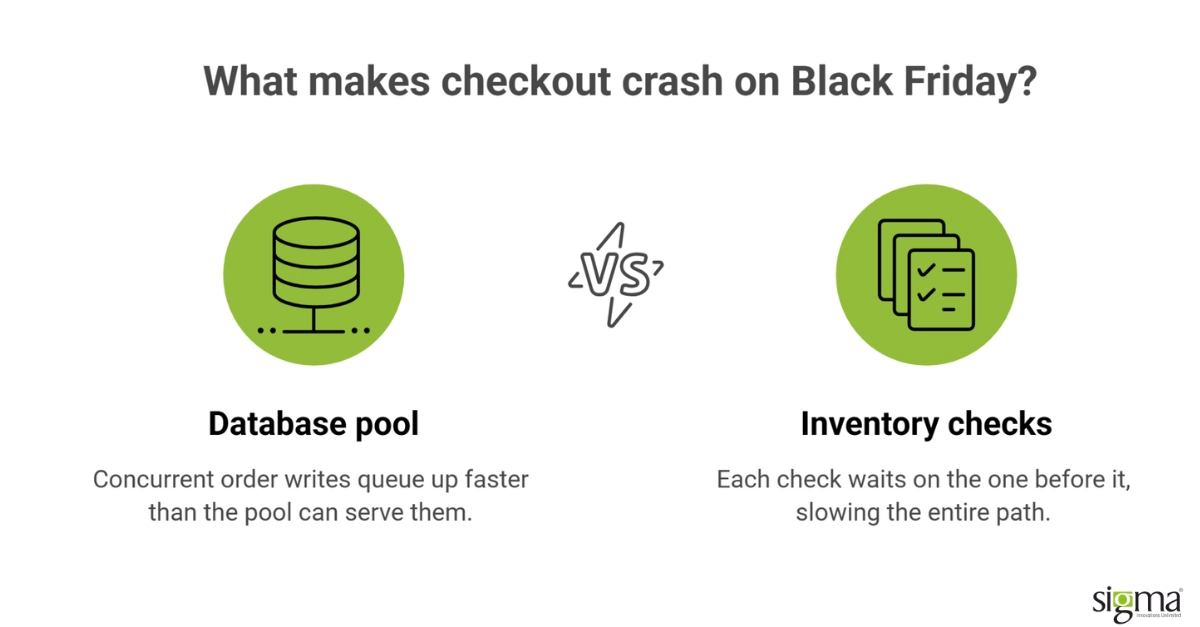
Checkout crashes on Black Friday because the components that support it, product-page queries, inventory checks, payment gateway calls, third-party scripts, and the database layer, are built and tested for everyday traffic, not demand spikes that can run five to ten times normal volume within a single hour. Each component has its own breaking point, and checkout fails at whichever one is reached first.
The failure modes that matter most at scale:
- Database connection pool exhaustion. Concurrent order writes queue up faster than the pool can serve them.
- Inventory checks that serialize instead of running in parallel. Each check waits on the one before it, slowing the entire path.
- Third-party scripts that block page render under load. Reviews widgets, personalization, and chat tools can stall checkout even when the store’s own code is fine.
- Payment gateway call volume exceeding a provisioned rate limit. The gateway itself becomes the bottleneck, not the store.
How Much Traffic Can My Store Handle?
How much traffic a store can handle is not one number; it depends on which part of the stack is weakest under concurrency. A store might serve product pages fine at ten times normal traffic while checkout fails at three times normal traffic because the database write path or the payment gateway, not the pages a shopper browses first, is the real limiting factor.
The only reliable way to know the actual ceiling is to test it directly against a modeled peak-traffic scenario. Estimating capacity from average-day analytics tells a retailer how the store behaves under conditions it already survives, not the conditions that matter during BFCM week.
The Peak Checkout Readiness Framework: How Do You Load Test an Ecommerce Checkout?
Load testing an ecommerce checkout means simulating concurrent shoppers moving through the full path, browsing, cart, payment, and confirmation, at volumes modeled on projected Black Friday traffic, then measuring where response times degrade, errors appear, or orders fail, rather than testing isolated pages on their own.
The Peak Checkout Readiness Framework runs in five steps:
- Model peak traffic. Project concurrent sessions and order volume from last year’s BFCM data plus this year’s ad spend and traffic growth.
- Stress-test the full checkout path. Simulate that concurrency against product, cart, payment, and confirmation steps together, not in isolation.
- Set go/no-go criteria in advance. Define the response time, error rate, and failed-order thresholds that would stop a launch before running the test.
- Run the test and compare against criteria. Identify which specific component breaks first and at what volume.
- Remediate and retest. Fix the weakest link, then rerun the same scenario to confirm the fix holds under the same load.
| Test scenario | What it simulates | Pass criteria | Fail signal |
|---|---|---|---|
| Baseline load | Normal daily peak traffic | Checkout completes within the agreed response time, no errors. | Any timeout or error at normal volume |
| Projected BFCM peak | Modeled concurrent shoppers at projected Black Friday volume | Checkout completes within the agreed threshold, with an error rate under the defined ceiling | Response time or error rate exceeds the threshold. |
| Burst spike | A sudden multi-fold jump within minutes, such as a flash-sale email or influencer link | The system absorbs the burst without crashing or queuing failed orders. | Crash, server errors, or orders silently dropped |
| Sustained peak | Projected peak volume held for several hours, the actual shape of BFCM weekend traffic | No performance decay over time, no connection pool exhaustion | Performance degrades the longer the load is sustained. |
| Third-party dependency failure | A payment gateway, review widget, or personalization script slows or times out. | Checkout degrades gracefully or falls back, rather than failing entirely | The whole checkout fails because one dependency failed. |
Calculating Revenue at Risk Before You Decide Go or No-Go
A straightforward way to translate a technical finding into a business number is to estimate projected BFCM revenue per hour, divide it into per-minute terms, and multiply by the number of minutes a failure scenario in testing suggests checkout could be degraded or unavailable. A store projecting $600,000 in Black Friday revenue across a 12-hour peak window is looking at roughly $833 per minute; a 20-minute checkout outage at that volume is a different conversation for leadership than an abstract “the test found some errors.”
This calculation does not need to be precise to be useful. Its purpose is to turn a go/no-go decision from a technical judgment call into a number the business can weigh against the cost of fixing the issue before launch.
Know whether checkout holds under Black Friday-scale traffic with a performance audit built to find the breaking point before shoppers do.
Why the Order of Testing Decides Whether Black Friday Readiness Actually Works
The order this work happens in matters as much as the work itself. A team that redesigns checkout UX or adds new frontend features first, then discovers during testing that the actual bottleneck is a database connection pool or a third-party script, has spent its limited pre-BFCM runway on the wrong layer. Testing the components that fail first under concurrency, before touching anything a shopper sees, protects the time available to fix what actually breaks.
Sigma Infosolutions runs performance audits and checkout load tests in that sequence: infrastructure and data layer first, integration points second, and frontend last, so remediation time goes to the component the test shows is actually the constraint. The frontend performance work Sigma carried out a modernization of the storefront for a California-based ecommerce retailer while preserving a shared multi-website Magento environment and the retailer’s live checkout connections, work that could not disrupt an operation already running. Orders rose 25% after launch.
See how a performance-first Magento modernization helped one retailer’s orders rise 25% after launch.
That same discipline, treating performance and operational reliability as one engineering problem rather than two separate projects, carried into a Shopify Plus environment supporting more than 50 retail locations alongside a growing online footprint for a Romania-based beauty brand, where Sigma unified multi-store operations and inventory synchronization to support continued growth.
Explore how Sigma unified multi-store Shopify Plus operations for a retailer operating in over 50 locations.
For a growth-stage retailer heading into BFCM 2026, a pre-peak performance audit surfaces the one or two components most likely to fail under this year’s traffic, before an ad-driven spike finds them first. Sigma can run that audit as a defined engagement or continue as a retainer engineering team through BFCM and into the next peak cycle.
Wrapping up:
An eCommerce checkout that performs well on an ordinary day gives no real evidence that it will hold during Black Friday traffic. The database layer, payment gateway calls, inventory checks, and third-party scripts behind checkout each have their own breaking point, and checkout fails at whichever one is reached first. Modeling peak traffic from last year’s data and this year’s growth plans turns a guess about readiness into a testable target. Stress-testing the full checkout path together, rather than isolated pages, is the only reliable way to find where that breaking point actually sits.
Go/no-go criteria defined before the test, not after a bad result, keep the launch decision objective rather than reactive. Comparing test scenarios, baseline, projected peak, burst spikes, sustained load, and dependency failure, surfaces failure modes that a single test would miss. Estimating revenue at risk from checkout downtime turns a technical finding into a number a business leader can act on directly. Fixing the weakest component first and retesting confirms whether a remediation actually holds rather than assuming it does.
The sequence in which this work happens matters as much as the work itself, since testing the wrong layer first wastes limited runway before Black Friday. A retailer that treats ecommerce checkout readiness as a pre-peak engineering practice protects ad spend, conversion, and customer trust during the week they are most exposed. The alternative, discovering the checkout’s real limits live during Black Friday traffic, costs far more than the test would have.
Is Your Checkout Ready for Black Friday?
Identify performance bottlenecks, validate checkout capacity, and address infrastructure risks before peak traffic arrives. Contact Sigma Infosolutions to plan a pre-BFCM performance assessment.
Frequently Asked Questions
Why does ecommerce checkout crash specifically during Black Friday?
eCommerce checkout crashes during Black Friday because traffic concentrates into a few hours at volumes far above normal, and the database, payment gateway, and third-party scripts behind checkout are rarely tested at that concurrency. A checkout that works fine under daily load can fail the moment concurrent sessions multiply, because the weakest component in the chain reaches its limit first.
How do you load test an ecommerce checkout before Black Friday?
Load testing an ecommerce checkout means simulating concurrent shoppers moving through the full path, browsing, cart, payment, and confirmation, at volumes modeled on projected Black Friday traffic, then measuring where response times degrade or orders fail. Testing the checkout path end to end, rather than individual pages, finds the component that actually limits capacity.
How much traffic can my ecommerce store realistically handle?
There is no single answer, because different components of the stack have different limits. A store might handle high traffic on product pages while checkout fails at lower concurrency, since the database write path or payment gateway is usually the real constraint. Direct load testing against a modeled peak scenario is the only reliable way to know the actual ceiling.
What should go/no-go readiness criteria for Black Friday actually include?
Go/no-go criteria should define, before testing begins, the maximum acceptable checkout response time, error rate, and failed-order rate under projected peak load. Setting these thresholds in advance keeps the launch decision objective, based on whether test results meet agreed numbers, rather than a subjective judgment made after a stressful test run.
Should a growth-stage retailer run peak-readiness testing in-house or bring in outside help?
It depends on whether the team has already load-tested checkout at Black Friday-scale concurrency and has the runway to do so again this year. Bringing in dedicated engineering support becomes more valuable when a lean team is balancing feature work against readiness testing, or when last year’s peak season surfaced failures nobody fully diagnosed.